Overall transaction control management
This menu is used to control all transactions of BXM online and takes precedence over the transaction setting values of Section 2.2, "Transaction parameter management".
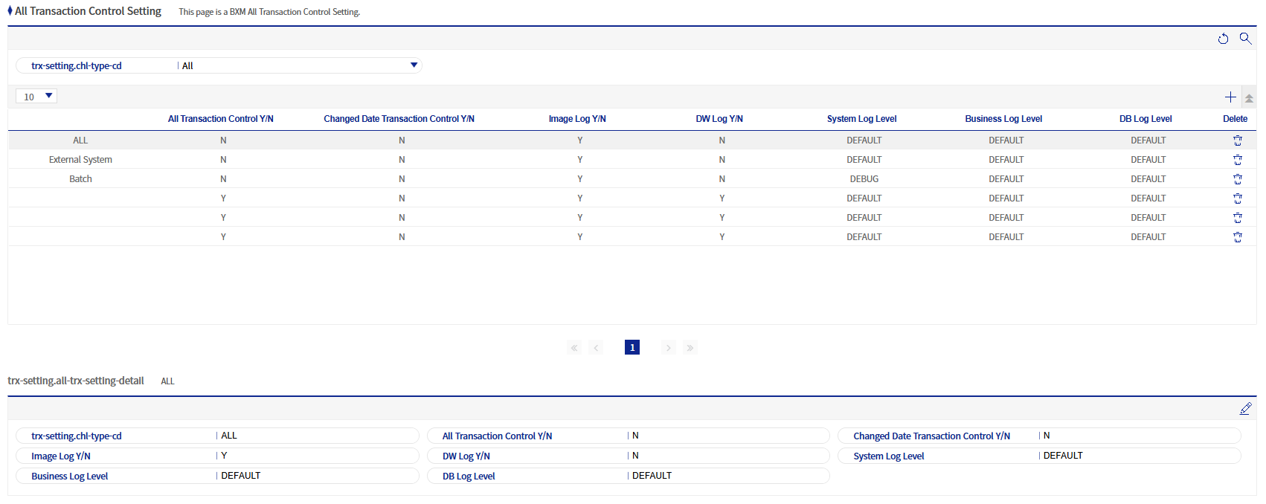
1. Overall transaction control details
Refer to the following table for descriptions of each field.
| Field name | Description |
|---|---|
Channel type |
You can set transaction control values for each channel. Channel types can be registered/deleted with code ID BXMDT0001 in Section 7.5, "Common code management". |
Overall transaction control status |
If set to 'Y', all transactions become unavailable. |
Date change transaction control status |
If set to 'Y', all transactions become unavailable when the date is changed. |
image log usage |
If set to 'Y', image logs are recorded for all transactions. |
DW log usage |
If set to 'Y', DW logs are recorded for all transactions. |
System log level |
Sets the system log level. Log levels are in the order of TRACE > DEBUG > INFO > WARN > ERROR, and if set to DEFAULT, the log level configured for the corresponding BXM application is applied. |
job log level |
Sets the job log level. Log levels are in the order of TRACE > DEBUG > INFO > WARN > ERROR, and if set to DEFAULT, the log level configured for the corresponding BXM application is applied. |
DB log level |
Sets the DB log level. Log levels are in the order of TRACE > DEBUG > INFO > WARN > ERROR, and if set to DEFAULT, the log level configured for the corresponding BXM application is applied. |