File Processing
The framework provides ItemReader and ItemWriter that handle file input/output as basic functions, and they are processed by being defined in the batch job xml.
1. File Processing Properties
-
"resource" (file path)
This property specifies the path of the file.
<bean id="RBMdpLoadCustFile100" parent="RFix" scope="step">
<property name="resource" value="file:///datafiles/bxmtest/rsample.dat" />-
"encoding" (encoding)
This property handles the encoding for files that are processed during file Read/Write.
<bean id="RBMdpLoadCustFile100" parent="RFix" scope="step">
    <property name="resource" value="file:///datafiles/bxmtest/rsample.dat" />
<property name="encoding" value="UTF-8" />-
"strict" (check whether the file exists)
This property checks whether the file exists and allows error/normal processing depending on the existence of the file.
-
true : Default value; if the file does not exist, an error is raised.
-
false : Processing proceeds normally even if the file does not exist.
<bean id="RBMdpLoadCustFile100" parent="RFix" scope="step">
    <property name="strict" value="true" />
</bean>-
"appendAllowed" (whether to append to the file)
-
true : If the file does not exist, it is created; if it exists, records are appended to the file.
-
false : If the file does not exist, it is created; if it exists, an Exception is thrown.
-
When this property is not defined : If the file does not exist, it is created; if it exists, it is OverWritten.
-
<bean id="RBMdpLoadCustFile100" parent="RFix" scope="step">
    <property name="appendAllowed" value="true" />
</bean>-
"lineSeparator" (file line breaks)
When reading/writing files, line breaks can be handled according to Windows or Unix mode. By default, when creating a file, the default value is determined by the system environment in which the batch is running.
-
lineSeparator setting values
- Carriage Return(CR) : 
- Line Feed(LF) : 
-
Windows mode (LF/CR) setting
<bean id="WBMdpWriteCustData100" parent="WFix" scope="step">
<property name="lineSeparator" value="
" />
…
</bean>-
Unix mode
Since batches basically run in a Unix environment, no setting is required.
-
Processing files without line breaks
If lineSeparator is set to "" (i.e., an empty value), files without line breaks can also be processed.
2. Fixed File Read
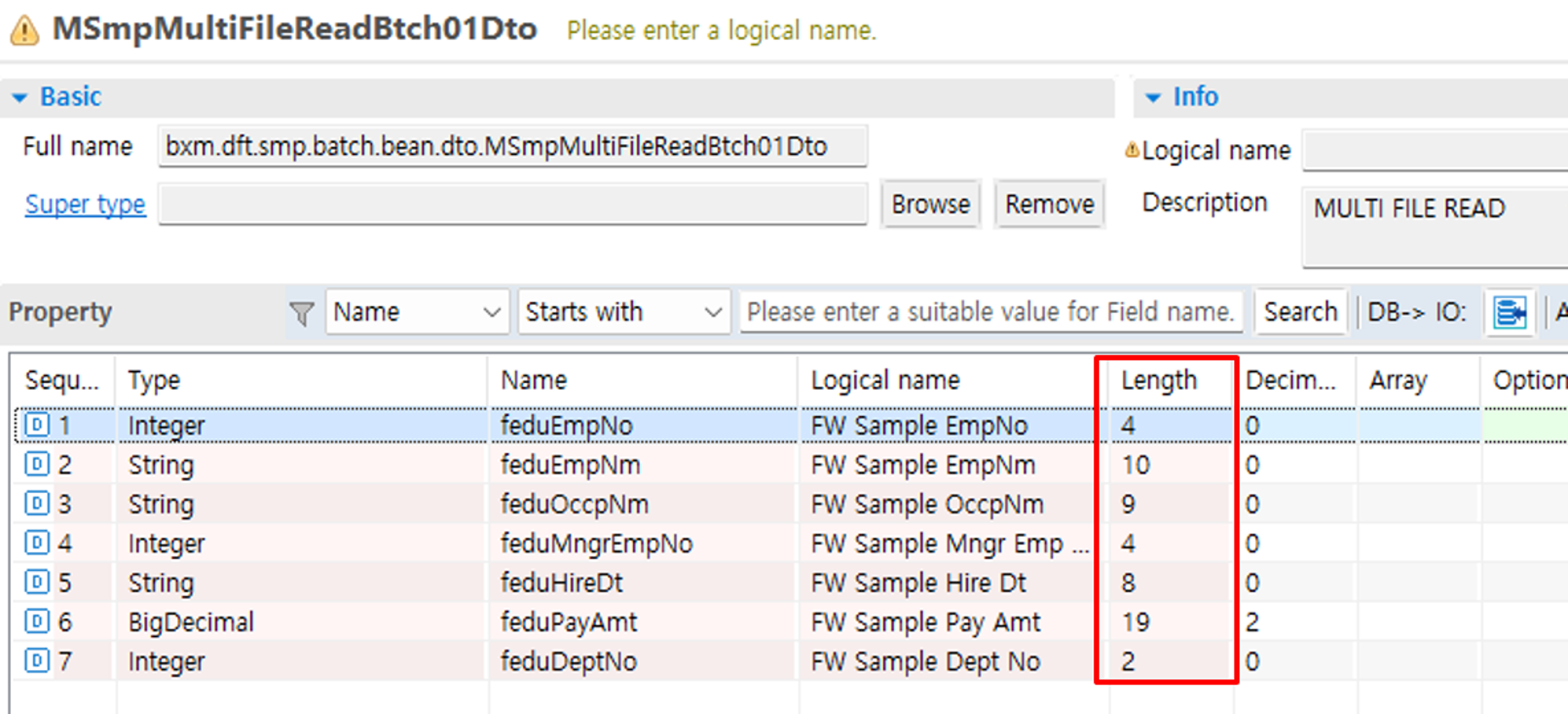
How to define batch job xml when reading files with a Fixed format
-
IO creation
-
Sample file to read
Data is read from the file according to the Length defined for each field of the IO. The sample file below is created with the Length values defined in the IO. (Blanks are represented by '_')

-
Batch job xml
<bean id="RBMdpLoadCustFile100" parent="RFix" scope="step">
    <property name="resource" value="file:///datafiles/bxm/dat/rsample.dat" />
    <property name="encoding" value="UTF-8" />
    <property name="targetType" value="bxm.dft.smp.batch.bean.dto.MSmpMultiFileReadBtch01Dto" />
</bean>
3. Fixed File Write
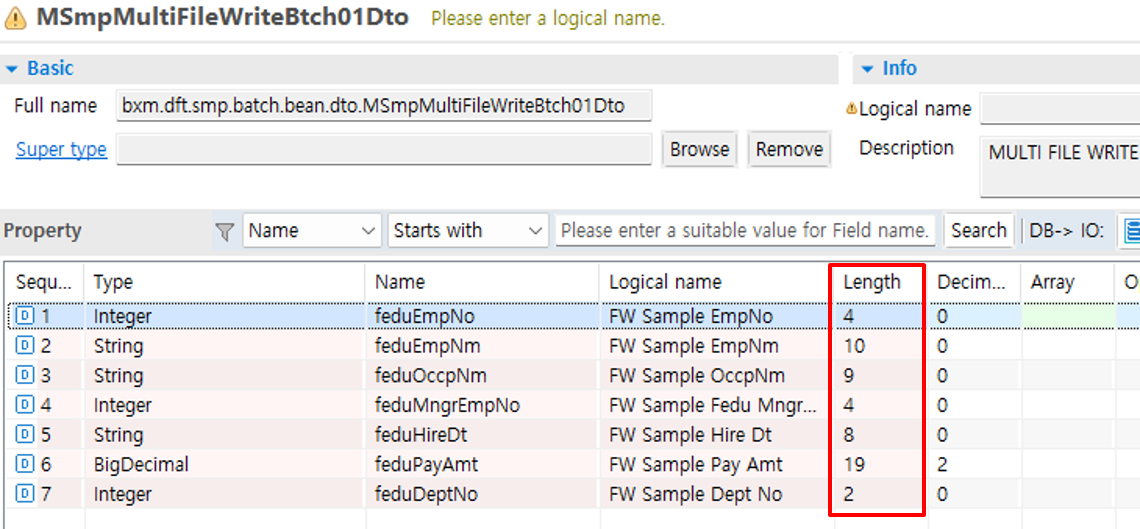
How to define batch job xml when writing files with a Fixed format
-
IO creation
-
Sample file to write
Data is written to the file according to the Length defined for each field of the IO. The sample file below is created with the Length values defined in the OMM. (Blanks are represented by '_')

-
Batch job xml
<bean id="WBMdpWriteCustData100" parent="WFix" scope="step">
    <property name="resource" value="file:///datafiles/bxm/dat/customer_data_wsample.dat" />
    <property name="encoding" value="UTF-8" />
    <property name="targetType" value="bxm.dft.smp.batch.bean.dto.MSmpMultiFileWriteBtch01Dto" />
</bean>
4. Delimited File Read
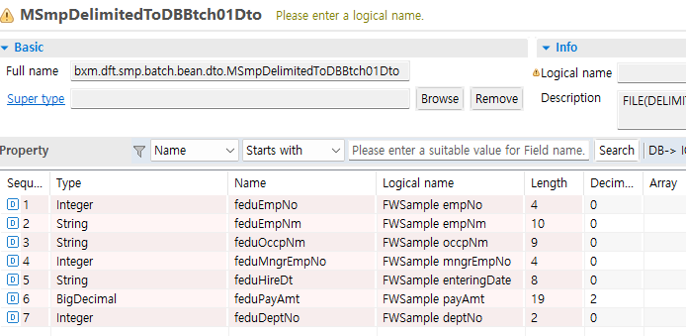
How to define batch job xml when reading files with a Delimited format
-
IO creation
-
Sample file to read
Sample that can be processed by separating the source file with the delimiter value ';' defined in the batch job xml.

-
Batch job xml
<bean id="RBMdpCustDataFiletoFile100" parent="RDelimit" scope="step">
    <property name="resource" value="file:///datafiles/bxm/dat/drsample.dat" />
    <property name="encoding" value="UTF-8" />
    <property name="delimiter" value=";" />
    <property name="targetType" value="bxm.dft.smp.batch.bean.dto.MSmpDelimitedToDBBtch01Dto" />
</bean>
5. Delimited File Write
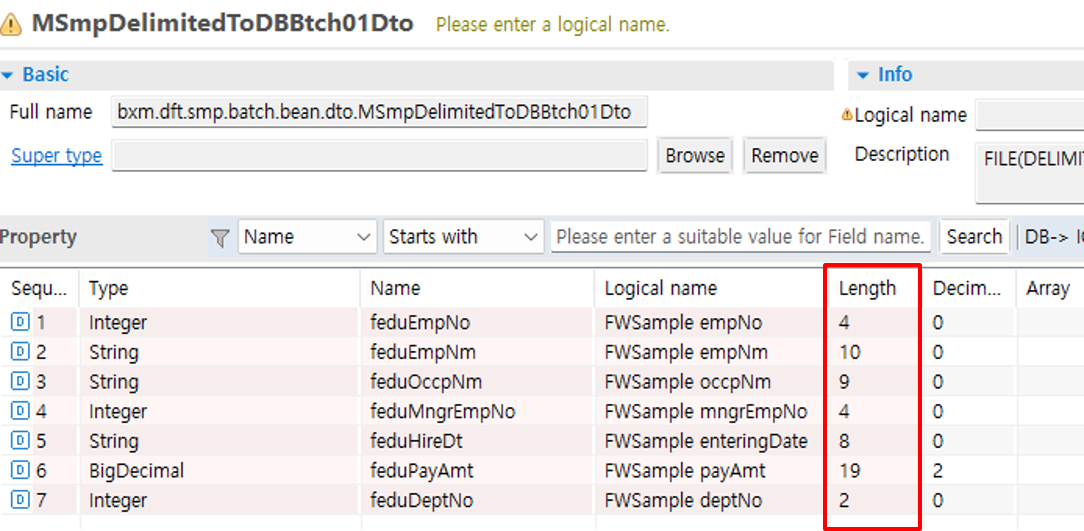
How to define batch job xml when writing files with a Delimited format
-
IO creation
-
Sample file to write
The file is created according to the field order defined in the IO.

-
Batch job xml
<bean id="WBMdpCustDataFiletoFile100" parent="WDelimit" scope="step">
    <property name="resource" value="file:///datafiles/bxm/dat/dwsample.dat" />
    <property name="encoding" value="UTF-8" />
    <property name="delimiter" value=";" />
    <property name="targetType" value="bxm.dft.smp.batch.bean.dto.MSmpFixedToDelimitedBtch01Dto" />
</bean>