Design Explorer
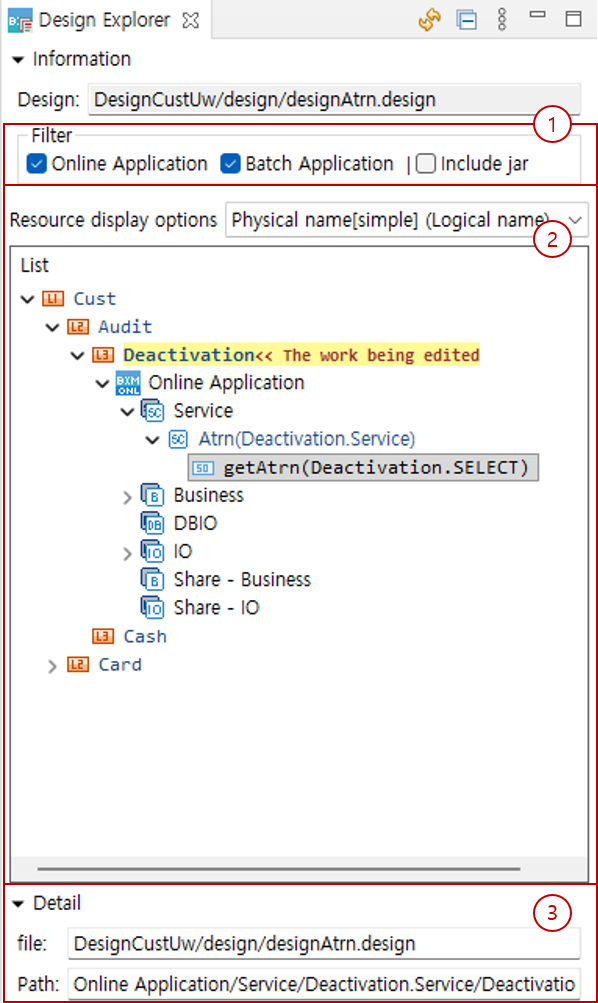
The Design Explorer is a view that displays a tree-structured list of components for the domain and the business under design. The Design Explorer view is composed as follows:
-
Filter
Filters the components to be checked in the explorer. Only the checked items are displayed.
-
List
This area displays the resource list. Resources registered in multiple design files are edited and displayed by domain unit.
The business currently being edited is highlighted in yellow, components other than those in the design file being edited are shown in gray, and resources belonging to the file being edited are shown in blue.
You can double-click to open the corresponding resource in the editor, and you can drag service methods, methods, and SQL IDs to the business area to add them to the flow. You can also drag IO to specify the input and output types of resources.
For jar files, only files included in the classpath are displayed, and a jar mark is added to the component icon for easy identification.
-
Detail
Displays the file path and the internal path within the file of the selected component.