Table Initialization
-
Create tables using the BXM table DDL (creation scripts).
-
DDL script location: 02_Sqls/ddl
-
The default DDL uses the UTF-8 character set. If you want to install it by changing it to another character set, convert it using iconv. For example, if you want to change it to ECU-KR and install it, execute the following command:
iconv -f UTF-8 -t EUC-KR ${source_filename}.sql > ${destination_filename}.sql -
BXM table creation SQL
File name Description Remarks bxm_ddl.sql
Online, batch table creation SQL
bxm_log_svc_ddl.sql
Service log table (1st to 31st) creation SQL
bxm_log_detail_ddl.sql
Log detail table (1st to 31st) creation SQL
Must be created together with the service log table
bxm_log_err_ddl.sql
Error log table (1st to 31st) creation SQL
bxm_log_img_ddl.sql
Image log table (1st to 31st) creation SQL
bxm_log_trx_ddl.sql
Transaction log table (1st to 31st) creation SQL
bxm_util_ddl.sql
BXM utility-related table creation SQL
spring_batch_ddl.sql
Spring Batch-related table creation SQL
studio_ddl.sql
Studio environment settings table creation SQL
admin_ddl.sql
Web Admin table creation SQL
dni_ddl.sql
App Analyzer-related table creation SQL
err_monitoring_ddl.sql
Error monitoring-related table creation SQL
sample_ddl.sql
Sample tables creation SQL
-
-
BXM tables
-
BXM tables - online, batch
BXM online, batch table list Table name Description Remarks BXM_ALL_TRX_CTRL
BXM overall transaction control
BXM_BATCH_URL
BXM batch URL
BXM_BEAN_QLFD_INFO
BXM bean qualification information
BXM_BEAN_INIT_LIST
BXM bean initialization list
BXM_DOMAIN
BXM domain
BXM_DEPLOY_VALID_IP
BXM deployment validation IP
BXM_DEPLOY_BIN
BXM deployment binary
BXM_DEPLOY_HST
BXM deployment history
BXM_RUNTIME_INSTANCE
BXM runtime instance
BXM_RUNTIME_APP
BXM runtime application
BXM_RUNTIME_SVC
BXM runtime service
BXM_TRX_INFO
BXM online transaction information
BXM_TRX_HST
BXM online transaction information change history
BXM_TRX_GRP_RLTON
BXM online transaction group relationship
BXM_TRX_GRP
BXM online transaction group
BXM_JOB_INFO
BXM batch job information
BXM_JOB_HST
BXM batch job information change history
BXM_JOB_INFO_EXT
BXM batch job information extension
BXM_JOB_GRP_RLTON
BXM batch job group relationship
BXM_JOB_GRP
BXM batch job group
BXM_JOB_DAEMON_INFO
BXM batch daemon information
BXM_JOB_DAEMON_HST
BXM batch daemon information change history
BXM_JOB_DAEMON_MONITORING
BXM batch daemon monitoring
BXM_JOB_DAEMON_ERR_LOG
BXM batch daemon error log
BXM_BEF_IMG_LOG
BXM Before Image log
-
BXM tables - util
BXM Util table list Table name Description Remarks BXM_CAL
BXM calendar
BXM_BIZ_DT
BXM business days
BXM_OMM_VALID_INFO
BXM OMM validation
BXM_OMM_VALID_APPLY_TYPE
BXM OMM validation apply type
BXM_COM_CFG
BXM configuration
BXM_COM_MSG
BXM Common message
BXM_SYS_MSG
BXM System message
-
BXM tables - Spring Batch
Spring Batch table list Table name Description Remarks F_BATCH_JOB_EXECUTION
Batch job execution information
F_BATCH_JOB_EXECUTION_CONTEXT
Batch job execution context information
F_BATCH_JOB_INSTANCE
Batch job instance
F_BATCH_JOB_EXECUTION_PARAMS
Batch job execution parameters
F_BATCH_STEP_EXECUTION
Batch job step execution information
F_BATCH_STEP_EXECUTION_CONTEXT
Batch job step execution context information
F_BATCH_JOB_EXECUTION_EXT
Batch job execution information extension
F_BATCH_STEP_EXECUTION_EXT
Batch job step execution information extension
F_BATCH_JOB_REGISTRY
Batch job real-time registry
F_BATCH_JOB_EXECUTION_LOG
Batch job application log
F_BATCH_RESTART_INFO
Batch job restart information
-
BXM tables - Log
BXM Log table list Table name Description Remarks BXM_LOG_SVC_[01…31]
BXM service log (1st to 31st)
BXM_LOG_DETAIL_[01…31]
BXM detail log (1st to 31st)
BXM_LOG_IMG_[01…31]
BXM image log (1st to 31st)
BXM_LOG_TRX_[01…31]
BXM job log (1st to 31st)
BXM_LOG_ERR_[01…31]
BXM error log (1st to 31st)
-
BXM tables - BXM Studio
BXM Studio table list Table name Description Remarks BXM_STUDIO_CFG
BXM Studio environment settings
BXM_OMM_META
OMM META information
BXM_OMM_META_VERSION
META system version
BXM_STUDIO_LOG
Development tool log
BXM_APP_CD
BXM Studio Excel design application code
BXM_USER_DB_ACCESS_AUTH
BXM user DB access authority
-
BXM tables - Web Admin
BXM Web Admin table list Table name Description Remarks BXM_USER_INFO
BXM user
BXM_COM_CD
BXM common code
BXM_COM_CD_DETAIL
BXM common code detail
BXM_USER_ROLE
BXM role
BXM_USER_ROLE_AUTH_RLTON
BXM role authority relationship
BXM_USER_AUTH
BXM authority
BXM_USER_ROLE_MENU_RLTON
BXM role-menu relationship
BXM_USER_MENU
BXM ADMIN menu
BXM_USER_ACTION_AUTH
BXM action authority
BXM_USER_FLD_AUTH
BXM field authority
BXM_USER_SVC_OP_AUTH
BXM operation authority
-
BXM tables - dni
BXM DNI table list Table name Description Remarks BXM_APP
BXM application
BXM_DNI_APP_STCS
BXM application statistics
BXM_DNI_SQL_INFO
BXM DBIO SQL ID analysis information
BXM_DBIO_QUERY
BXM DBIO query
BXM_DBIO_QUERY_ERR
BXM DBIO query error history
BXM_DNI_RESOURCE
BXM resource analysis information
BXM_DNI_METHOD
BXM method analysis information
BXM_DNI_METHOD_PARAM
BXM method parameter information
BXM_DNI_METHOD_CALLEE
BXM method callee call information
BXM_DNI_SVC_CALLEE
BXM method service call information
BXM_DNI_ROOT_SVC
BXM Root service information
-
BXM tables - error monitoring
BXM err monitoring table list Table name Description Remarks BXM_ERR_EVENT_CNDT
BXM error management condition
BXM_ERR_EVENT_HST
BXM event occurrence history
BXM_ERR_AGGR
BXM error aggregation
BXM_ERR_EVENT_AGGR
BXM error event aggregation
-
BXM Sequence - Spring Batch
Spring Batch Sequence list Table name Description Remarks F_BATCH_JOB_EXECUTION_SEQ
Batch job execution sequence
F_BATCH_JOB_SEQ
Batch job sequence
F_BATCH_STEP_EXECUTION_SEQ
Batch step execution sequence
-
-
Generate basic data using the BXM table DML.
-
DML script location: 02_Sqls/dml
-
The default DML uses the UTF-8 character set. If you want to install it by changing it to another character set, convert it using iconv. For example, if you want to change it to ECU-KR and install it, execute the following command:
iconv -f UTF-8 -t EUC-KR ${source_filename}.sql > ${destination_filename}.sql -
BXM basic data creation SQL
File name Description Remarks bxm_dml.sql
Online DML
batch_dml.sql
Batch DML
webadmin_dml.sql
DML for Web Admin
webadmin_total_menu.sql
Menu list DML for Web Admin
studio_dml.sql
Studio environment settings DML
deploy_dml.sql
Deployment DML
bizdate_dml.sql
Business days DML
dni_dml.sql
App Analyzer DML
sample_dml.sql
Sample DML
-
-
Modify configuration values according to the user environment.
-
In the BXM_STUDIO_CFG table, modify the PROPS_VAL corresponding to the following items. For detailed information on each configuration value, refer to the guide "BXM Configuration Guide - Development Tool".

-
database.connection.properties: Database connection configuration information
-
-
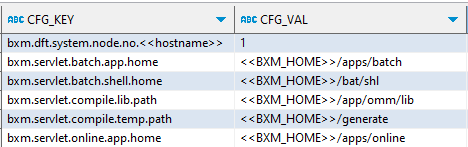
In the BXM_COM_CFG table, find the following CFG_KEY and modify the corresponding CFG_VAL.
-
bxm.dft.system.node.no.<< hostname >>: Modify the << hostname >> part of cfg_key to the host name and set the cfg_val value to 1.
-
bxm.servlet.batch.app.home: Batch application deployment home. Modify << BXM_HOME >>.
-
bxm.servlet.batch.shell.home: Batch shell deployment home. Modify << BXM_HOME >>.
-
bxm.servlet.compile.lib.path: Location of lib files required for class compilation. Modify << BXM_HOME >>.
-
bxm.servlet.compile.temp.path: Location where omm, java, class files are generated. Modify << BXM_HOME >>.
-
bxm.servlet.online.app.home: Online application deployment home. Modify << BXM_HOME >>.
-
-
Add the following record to the BXM_DOMAIN table.
Set DOMAIN_ID, DOMAIN_NM, DOMAIN_DESC as shown in the figure.

-