App Analyzer Structure
The analysis methods include Shell execution, Studio link-flow analysis, and link-flow analysis, and this section describes the analysis structure and methods.
1. Overall Resource App Analyzer Using Shell
-
Analysis structure
The shell analysis targets all resources deployed on the server (.class, .dbio files, etc.). Use this when you want to perform App Analyzer for all files.
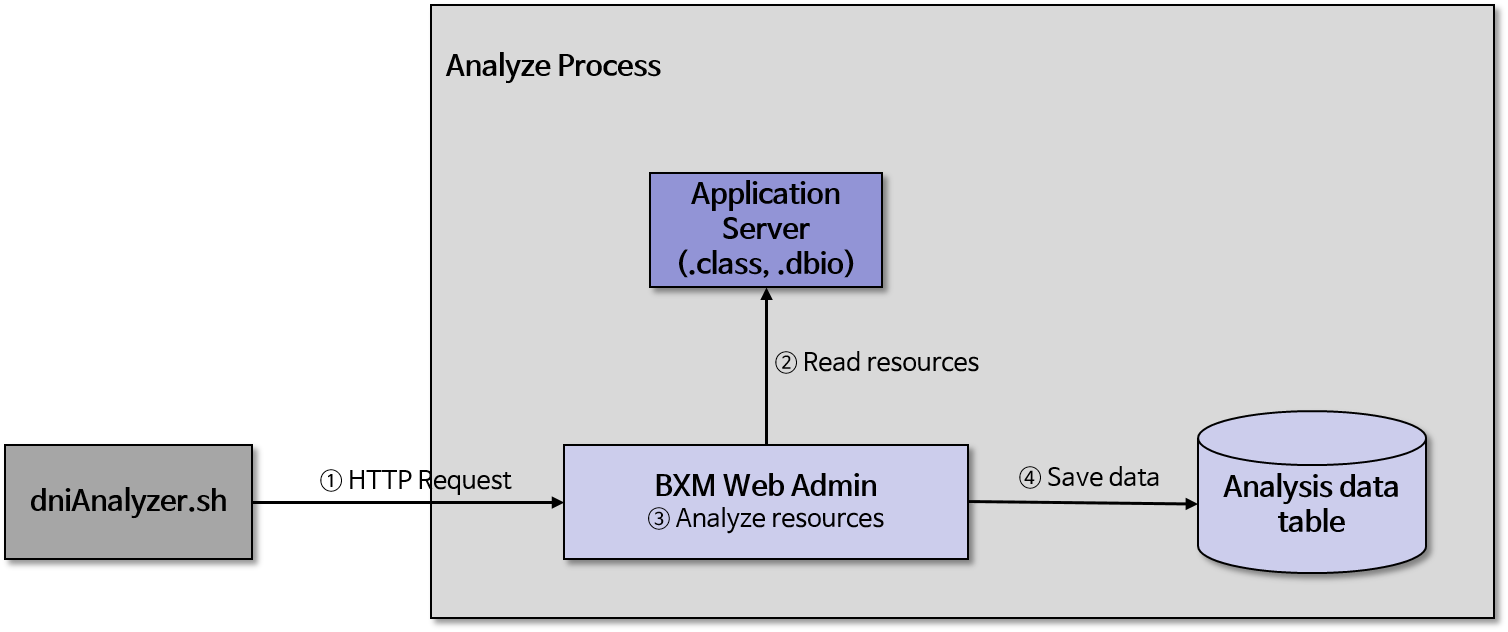 Figure 1. BXM Web Admin App Analyzer Flow
All resources developed with BXM in the target directory are analyzed. Depending on system performance and the amount of resources, it may take a long time.
-
Analysis method
-
Check that BXM Web Admin is running.
-
Check the datasource.properties settings under $BXM_HOME/bin/config.
-
Execute dniAnalyzer.sh under $BXM_HOME/bin.
You can check the App Analyzer log in the log of BXM Web Admin.
-