1. Batch Job Flow Definition
The definition of a batch job is divided into defining the basic attributes of a Job and defining the Step flow. The following describes the attributes and Step flows supported by the framework.
2. Batch Job Attributes
restartable: A setting value that determines whether a batch that was previously executed and terminated in an error state can be restarted.
※ Note: If the "Parameter duplicated execution" setting is "Y" in the web admin batch job management, the job is re-executed from the beginning and this option is not applied.
<job id="BMdpLoadCustData" restartable="true">
    <step id="BMdpLoadCustData100" next="BMdpLoadCustData200"/>
    …
</job>
3. Step Flow
3.1. Step Sequential Flow
As the most common execution flow for Steps that can be defined in a batch job, the framework first executes the Step defined first, then sequentially executes the Step whose name is specified in the "next" attribute. If an error occurs during the execution of a Step, the batch job does not proceed further and an execution error is raised.
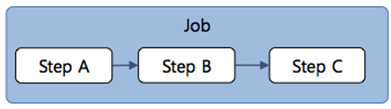
<job id="BMdpLoadCustData" restartable="true">
    <step id="BMdpLoadCustData100" next="BMdpLoadCustData200"/>
    <step id="BMdpLoadCustData200" next="BMdpLoadCustData300"/>
    <step id="BMdpLoadCustData300"/>
</job>
3.2. Step Execution Result Branch Flow
In general, the execution of a batch job proceeds such that when an error occurs in an individual Step, an execution error occurs and the batch job is stopped. However, for business requirements such as “if the Step that reads and processes a specific file fails, the Step that retrieves data from the DB and processes it must be executed,” you can define the flow as shown below so that, based on the determination of a Step failure, another Step is executed.
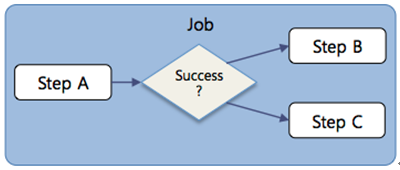
<job id="BMdpLoadCustData">
    <step id="BMdpLoadCustData100">
        <next on="COMPLETED" to="BMdpLoadCustData200"/> <!-- Normal -->
        <next on="*" to="BMdpLoadCustData300"/> <!-- Result values other than normal -->
    </step>
    <step id="BMdpLoadCustData200"/>
    <step id="BMdpLoadCustData300"/>
</job>
3.3. Step Parallel Execution Flow
Due to the characteristics of batch jobs, some individual Steps executed internally can sometimes be processed regardless of order.
For example, in a batch job composed of Step B, which stores B business data from a file to the DB; Step C, which stores C business data from a file to the DB; and Step D, which generates a report by retrieving the B business data and C business data stored as a result of Step B and Step C, Step B and Step C can be executed simultaneously regardless of the job order, and Step D must be executed only after all preceding Steps are completed. To reflect such requirements, you can define a flow as in the example below, where Steps that are independent of order are processed simultaneously and then proceed to the next Step.
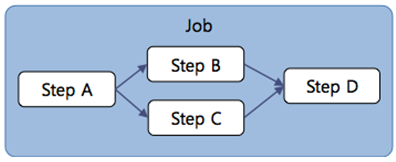
<job id="BMdpLoadCustData">
    <split id="BMdpLoadCustData100" next="BMdpLoadCustData200">
        <flow>
            <step id="BMdpLoadCustData101">
                <tasklet tm-datasource="MainDS"/>
            </step>
        </flow>
        <flow>
            <step id="BMdpLoadCustData102">
                <tasklet tm-datasource="MainDS"/>
            </step>
        </flow>
    </split>
    <step id="BMdpLoadCustData200"/>
</job>
As a reference, when using Split, you must define the DataSource used in the corresponding Step using the "tm-datasource" attribute value.