Paging Select
This is used in transactions that query a large amount of data from the UI by retrieving only an appropriate number of records at a time. This is to ensure server stability by reducing the processing time and memory usage of online services.
1. Top-N Method
1.1. Format
-
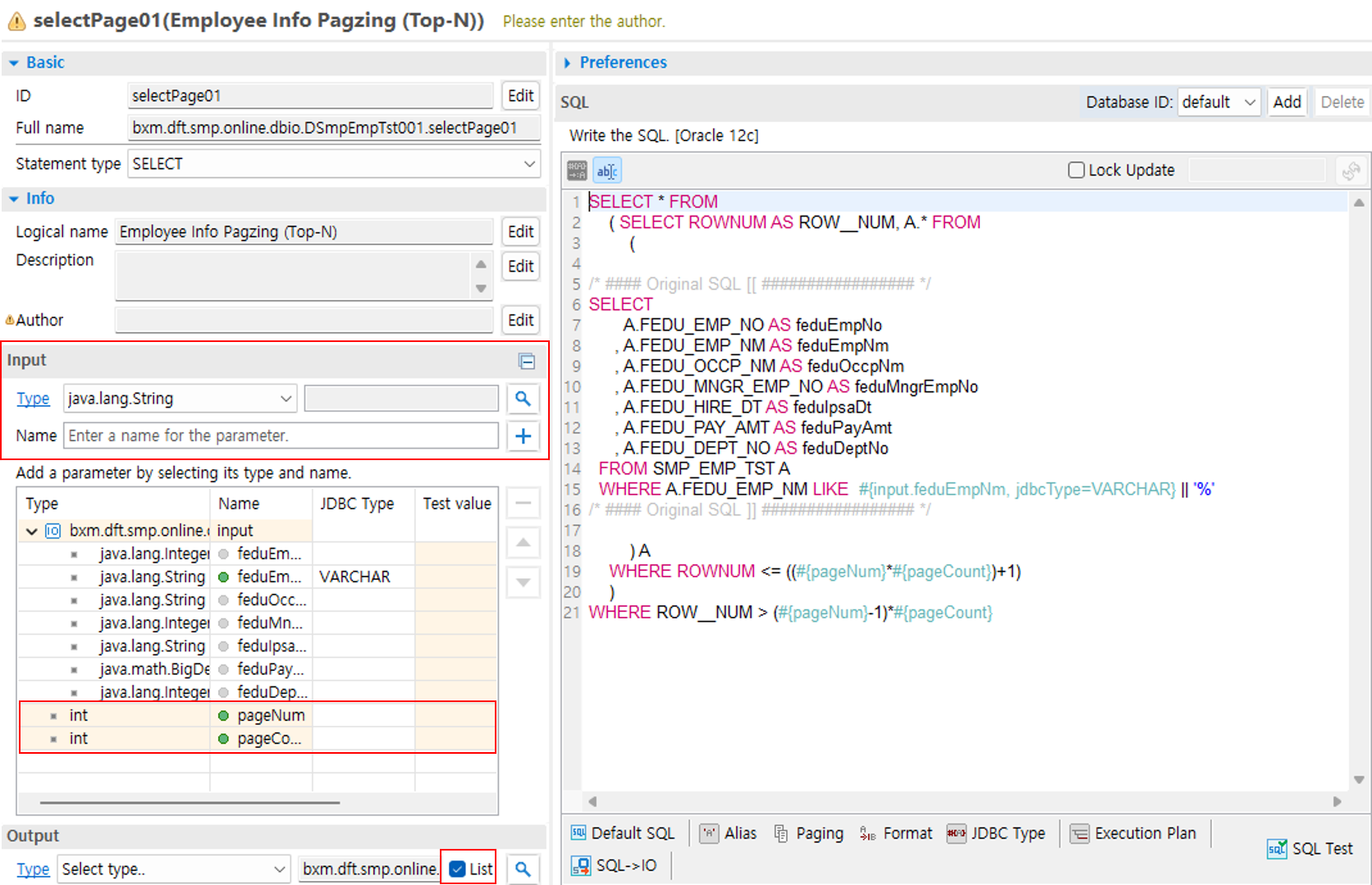
Input
-
Add an input IO. Since paging variables must also be added at this time, you must enter an Alias Name for the input IO when adding it.
-
In addition to the input IO, add the paging variables. (They are automatically added when you click the [Paging] button in the DBIO editor.)
-
Integer pageNum: Page number to retrieve
-
Integer pageCount: Number of records to display per page
-
-
Output
-
Since paging is also a multiple-record query, check [is Array].
-
-
SQL
-
Enter SQL and then click the [Paging] button → [Top-N Method] to add the paging query. When using variables of the input IO in SQL, you must use them in the 'AliasName.variableName' format. Refer to #{input.feduEmpNm} in the SQL of the screen below.
-
1.2. Development and Notes
Processing of the query result is the same as for list queries. You can check whether the next page exists using the DasUtils.existNextResult() utility.
List<DSmpEmpTst000Dto> list = dSmpEmpTst001.selectList01(input);

output.setHasNext(DasUtils.existNextResult(list) ? "Y" : "N"); // Whether next data exists
1.3. DBIO Sample
The following is the SQL used in the sample.
SELECT * FROM
    ( SELECT ROWNUM AS ROW__NUM, A.* FROM
        (

/* #### Original SQL [[ ################# */
SELECT
       A.FEDU_EMP_NO AS feduEmpNo
     , A.FEDU_EMP_NM AS feduEmpNm
     , A.FEDU_OCCP_NM AS feduOccpNm
     , A.FEDU_MNGR_EMP_NO AS feduMngrEmpNo
     , A.FEDU_HIRE_DT AS feduHireDt
     , A.FEDU_PAY_AMT AS feduPayAmt
     , A.FEDU_DEPT_NO AS feduDeptNo
  FROM SMP_EMP_TST A
  WHERE A.FEDU_EMP_NM LIKE  #{input.feduEmpNm, jdbcType=VARCHAR} || '%'
  ORDER BY A.FEDU_EMP_NO ASC
/* #### Original SQL ]] ################# */

        ) A
    WHERE ROWNUM <= ((#{pageNum}*#{pageCount})+1)
    )
WHERE ROW__NUM > (#{pageNum}-1)*#{pageCount}
1.4. Bean Sample
@BxmCategory(logicalName = "Select Paging")
public SSMP1003A002OutDto getEmpInfPagzingTopNWithPage(SSMP1003A002InDto input , SSMP1003A002OutDto output) throws DefaultApplicationException {
    logger.debug("============== START ==============");
    logger.debug("input = {}", input);

    dSmpEmpTst001 = DefaultApplicationContext.getBean(dSmpEmpTst001, DSmpEmpTst001.class);

    List<DSmpEmpTst001selectPage01OutDto> dbioOut = null;

    int pageNum   = input.getPageNum();
    int pageCount = input.getPageCount();

    DSmpEmpTst001selectPage01InDto dbioInput = new DSmpEmpTst001selectPage01InDto();

    {
        dbioInput.setFeduEmpNm(input.getFeduEmpNm());
    }

    int totalCount = dSmpEmpTst001.selectCount01(dbioInput).intValue();
    dbioOut = dSmpEmpTst001.selectPage01(dbioInput, pageNum, pageCount);

    SSMP1003A002OutDtoSubGrid01 outDtoSub01 = null;

    for (DSmpEmpTst001selectPage01OutDto fetchDto : dbioOut) {
        outDtoSub01 = new SSMP1003A002OutDtoSubGrid01();
        // Generated by code generator [[
        outDtoSub01.setFeduEmpNo(fetchDto.getFeduEmpNo());
        outDtoSub01.setFeduEmpNm(fetchDto.getFeduEmpNm());
        outDtoSub01.setFeduOccpNm(fetchDto.getFeduOccpNm());
        outDtoSub01.setFeduMngrEmpNo(fetchDto.getFeduMngrEmpNo());
        outDtoSub01.setFeduHireDt(fetchDto.getFeduHireDt());
        outDtoSub01.setFeduPayAmt(fetchDto.getFeduPayAmt());
        outDtoSub01.setFeduDeptNo(fetchDto.getFeduDeptNo());
        // Generated by code generator ]]

        output.getGrid01().add(outDtoSub01);
    }

    {
        output.setPageNum(input.getPageNum());
        output.setPageCount(input.getPageCount());
        output.setTotalCount(totalCount);
    }

    logger.debug("output = {}", output);
    logger.debug("============== END ==============");

    return output;
}
2. Next Key Method
2.1. Format
-
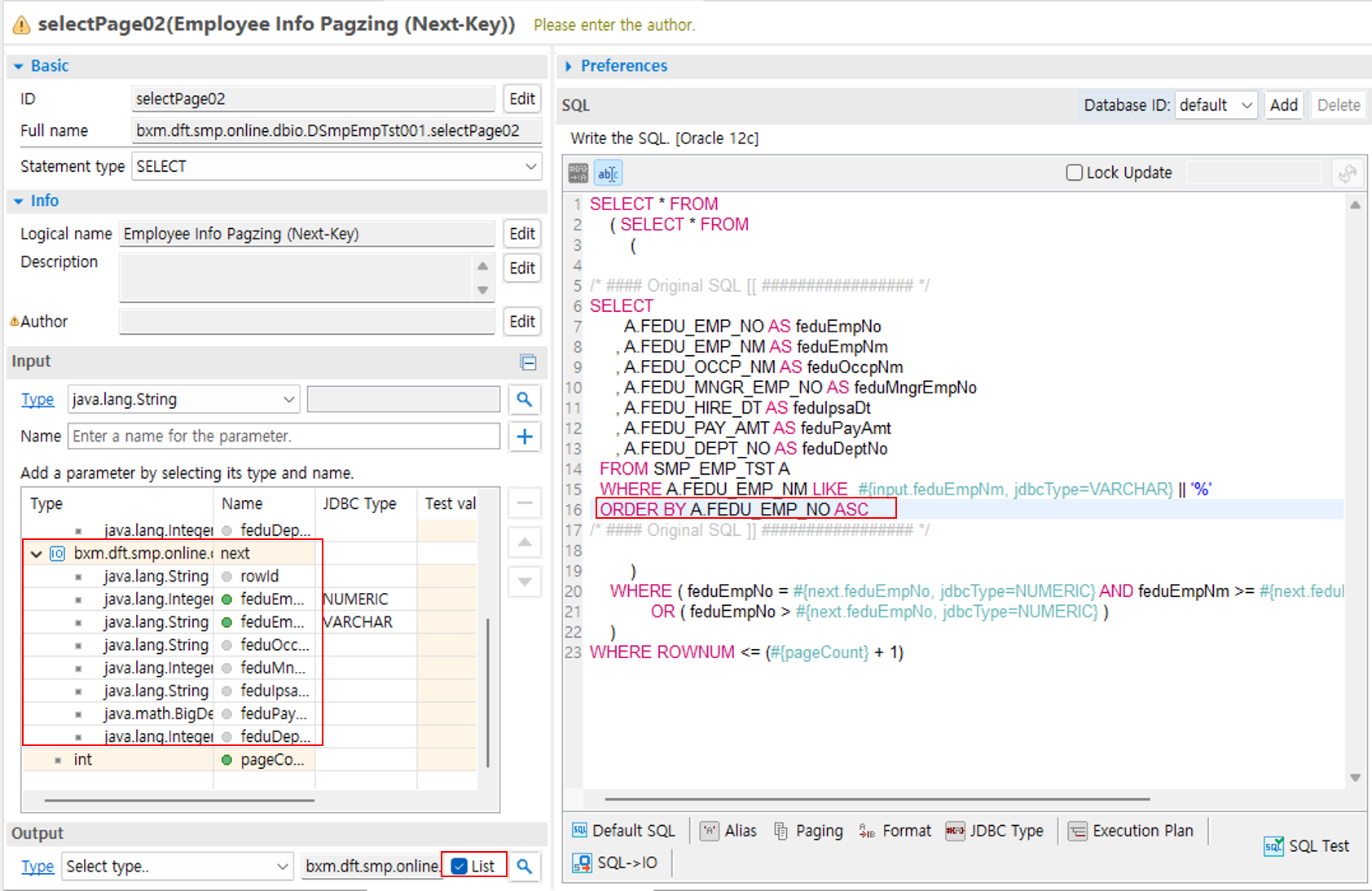
Input
-
Add an input IO. Since paging variables must also be added at this time, you must enter an Alias Name for the input IO when adding it.
-
In addition to the input IO, add the paging variables. (They are automatically added when you click the [Page] button in the DBIO editor.)
-
Output IO type next: IO that holds the key of the page query
-
int pageCount: Number of records to display per page
-
-
Output
-
Since paging is also a multiple-record query, check [is Array].
-
-
SQL
-
Enter SQL and then click the [Page] button → [Next Key Method] to add the paging query. When using variables of the input IO in SQL, you must use them in the 'AliasName.variableName' format. Refer to #{input.feduEmpNm} in the SQL of the screen below.
-
order key: Key (field) used to sort the list. If there is an ORDER BY clause in the multiple Select SQL, the column is automatically loaded. You can also enter it manually.
-
2.2. Development and Notes
Processing of the query result is the same as for list queries. You can check whether the next page exists using the DasUtils.existNextResult() utility.
List<DSmpEmpTst000Dto> list = dSmpEmpTst001.selectList02(input);

output.setHasNext(DasUtils.existNextResult(list) ? "Y" : "N"); // Whether next data exists
2.3. DBIO Sample
The input/output IO reuses the DSmpEmpTst000Dto IO that was used when creating the single-record query service. The following is the SQL used in the sample.
SELECT * FROM
    ( SELECT * FROM
        (

/* #### Original SQL [[ ################# */
SELECT
       FEDU_EMP_NO AS feduEmpNo
     , FEDU_EMP_NM AS feduEmpNm
     , FEDU_OCCP_NM AS feduOccpNm
     , FEDU_MNGR_EMP_NO AS feduMngrEmpNo
     , FEDU_IPSA_DT AS feduIpsaDt
     , FEDU_PAY_AMT AS feduPayAmt
     , FEDU_DEPT_NO AS feduDeptNo
  FROM SMP_EMP_TST
  WHERE FEDU_EMP_NM LIKE  #{input.feduEmpNm} || '%'
  ORDER BY FEDU_EMP_NO ASC
/* #### Original SQL ]] ################# */

        )
    WHERE ( ( #{next.feduEmpNo} IS NULL OR a.fedu_emp_no > #{next.feduEmpNo} ) )
    )
WHERE ROWNUM <= (#{pageCount} + 1)
2.4. Bean Sample
@BxmCategory(logicalName = "Select Paging")
public SSMP1003A003OutDto getEmpInfPagzingNextKey(SSMP1003A003InDto input , SSMP1003A003OutDto output) throws DefaultApplicationException {

    logger.debug("============== START ==============");
    logger.debug("input = {}", input);

    dSmpEmpTst001 = DefaultApplicationContext.getBean(dSmpEmpTst001, DSmpEmpTst001.class);

    List<DSmpEmpTst000Dto> beanOutput = null;

    DSmpEmpTst000Dto dbioInput = new DSmpEmpTst000Dto();
    DSmpEmpTst000Dto nextInput = new DSmpEmpTst000Dto();

    SSMP1003A003OutDtoSubGrid01 outDtoSub01 = null;

    int pageCount;

    /**
     * @BXMType LogicalArea
     * @Desc DTO mapping
     */
    {
        pageCount = input.getReqCount();
        dbioInput.setFeduEmpNm(input.getFeduEmpNm());
        nextInput.setFeduEmpNo(input.getNextFeduEmpNo());
        nextInput.setFeduEmpNm(input.getNextFeduEmpNm());
    }


    /**
     * @BXMType DbioCall
     * @Desc Select multi employee info on page sql(Next-Key)
     */
    beanOutput = dSmpEmpTst001.selectPage02(dbioInput, nextInput, pageCount);

    /**
     * @BXMType LogicalArea
     * @Desc output data mapping
     */
    {
        output.setReqCount(input.getReqCount());
        output.setGrid01_COUNT(beanOutput.size());
        output.setHasNext(DasUtils.existNextResult(beanOutput) ? "Y" : "N");
    }

    /**
     * @BXMType Loop
     * @Desc output data mapping
     */
    for (DSmpEmpTst000Dto fetchDto : beanOutput) {

        outDtoSub01 = new SSMP1003A003OutDtoSubGrid01();

        // Generated by code generator [[
        outDtoSub01.setFeduEmpNo(fetchDto.getFeduEmpNo());
        outDtoSub01.setFeduEmpNm(fetchDto.getFeduEmpNm());
        outDtoSub01.setFeduOccpNm(fetchDto.getFeduOccpNm());
        outDtoSub01.setFeduMngrEmpNo(fetchDto.getFeduMngrEmpNo());
        outDtoSub01.setFeduHireDt(fetchDto.getFeduHireDt());
        outDtoSub01.setFeduPayAmt(fetchDto.getFeduPayAmt());
        outDtoSub01.setFeduDeptNo(fetchDto.getFeduDeptNo());
        // Generated by code generator ]]
        output.getGrid01().add(outDtoSub01);
    }

    logger.debug("output = {}", output);
    logger.debug("============== END ==============");

    return output;
}