Creating a Data Input Batch Program
Create a batch program that loads input data using the APIs provided by BXM Center-Cut. Refer to the next chapter for detailed API specifications.
1. Example of a batch job
Create a batch job that reads a sample file and inputs it into the Center-Cut DB.
<?xml version="1.0" encoding="UTF-8"?>
<beans xmlns="http://www.springframework.org/schema/beans" xmlns:xsi="http://www.w3.org/2001/XMLSchema-instance"
xmlns:batch-int="http://www.springframework.org/schema/batch-integration"
xsi:schemaLocation="http://www.bankwareglobal.com/schema/batchex http://www.bankwareglobal.com/schema/batchex/spring-batch-ex.xsd
                    http://www.springframework.org/schema/beans http://www.springframework.org/schema/beans/spring-beans.xsd
                    http://www.springframework.org/schema/batch-integration http://www.springframework.org/schema/batch-integration/spring-batch-integration.xsd">

    <import resource="classpath:JobConfig.xml"/>

    <job-component xmlns="http://www.bankwareglobal.com/schema/batchex" id="jobcomp" with-dependon="true">
        <base-package name="bxm.dft.cc.bat.bean">
            <include name="DepositCcBatch*" />
        </base-package>
    </job-component>

    <job id="DepositCcBatch" xmlns="http://www.bankwareglobal.com/schema/batchex">
        <step id="DepositCcBatch_S01" parent="parentStep">
            <tasklet tm-datasource="MainDS">
                    <chunk reader="DepositCcBatch_R01" processor="DepositCcBatchBean" commit-interval="200" />
            </tasklet>
        </step>
    </job>


    <bean id="DepositCcBatch_R01" class="bxm.batch.item.file.AsynchronousFlatFileItemReader"
        scope="step">
        <property name="resource"
            value="file:////testData/CCINPUT_test.dat" />
        <property name="queueSize" value="400" />
        <property name="itemMapper">
            <bean class="bxm.batch.item.file.mapping.ItemOmmMapper">
                <property name="targetType"
                    value="bxm.dft.cc.bat.bean.dto.InterestCalculationBatchOut" />
            </bean>
        </property>
    </bean>

</beans>
2. Example of the sample file to be read
Create a sample file whose contents follow the FLD Format of bxm.dft.cc.bat.bean.dto.InterestCalculationBatchOut.
1         601   00000000000000000300
2         602   00000000000000000300
3         603   00000000000000000300
4         604   00000000000000000300
5         605   00000000000000000300
6         606   00000000000000000300
7         607   00000000000000000300
8         608   00000000000000000300
9         609   00000000000000000300
10        610   00000000000000000300
11        611   00000000000000000300
12        612   00000000000000000300
13        613   00000000000000000300
14        614   00000000000000000300
15        615   00000000000000000300
16        616   00000000000000000300
17        617   00000000000000000300
18        618   00000000000000000300
19        619   00000000000000000300
20        620   00000000000000000300
It is recommended to prepare a larger amount of data for testing with reference to the above sample. For guidance purposes, 1,000 records were created.
3. Example of a batch program
Develop the batch program in Chunked type and add @BeforeStep and @AfterStep.
@BxmBean("DepositCcBatchBean")
@Scope("step")
@BxmCategory(logicalName = "Interest Deposit Center-Cut Batch", description = "Interest Deposit Center-Cut Batch")
public class DepositCcBatch implements ItemProcessor<InterestCalculationBatchOut, InterestCalculationBatchOut> {
    final Logger logger = LoggerFactory.getLogger(this.getClass());

    private CcutContext context;
    private final String CCID = "CCID";
    private final String DOMAIN_ID = "domainId";
    private int count = 0;

    @BeforeStep
    public void beforStep(StepExecution stepExecution) throws Exception {
        String domainId = BatchApplicationContext.getJobParameters().getString(DOMAIN_ID);
        String ccId = BatchApplicationContext.getJobParameters().getString(CCID);
        logger.info("Domain ID  [{}]", domainId);
        logger.info("CenterCut ID  [{}]", ccId);

        SimpleDateFormat date = new SimpleDateFormat("yyyyMMdd");
        String pcsnDt = date.format(new Date());

        // Automatically generate the Acceptance Number
        int acptNo = BXMCcutAcptNumberingUtils.getNewAcptNo(domainId, ccId, pcsnDt);
        logger.info("Generated new AcptNo: [{}]", acptNo);
        context = BXMCcutWorkUtils.startSelection(domainId, ccId, pcsnDt, acptNo, 1);

        logger.debug("%%%%%% CcutContext Info: [{}]", context);
    }

    @Override
    public InterestCalculationBatchOut process(InterestCalculationBatchOut input) throws Exception {
        BXMCcutWorkUtils.processSelection(context, input.getCusNo(), input.getIntAmt(), input);

        return input;
    }

    @AfterStep
    public ExitStatus afterStep(StepExecution stepExecution) throws Exception {
        if (stepExecution.getExitStatus().getExitCode().equals("COMPLETED")) {
            BXMCcutWorkUtils.endSelection(context);
        }
        return stepExecution.getExitStatus();
    }

}
The IO to be used is defined as follows.
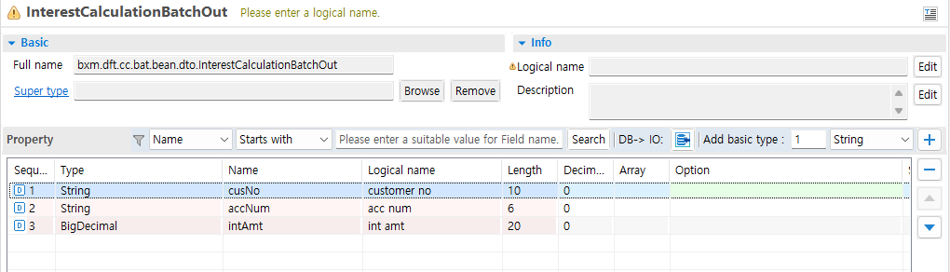
Figure 1. InterestCalculationBatchOut