Online Application Naming Rules
1. Application
An application unit is divided into units where the management authority differs and where function calls between applications can be minimized. Applications are created through the 'Bxm Application' menu in Studio.
The examples in this chapter are based on Bxm standard sample code, and can be flexibly changed depending on the project situation.
| Classification | Description |
|---|---|
Composition |
L1 code + L2 code + L3 code |
Example of application |
BxmDftSmp |
Basic principle |
|
2. Service
Services are created through the 'Service Class' menu in Studio, and the Service class name and Service name are written as follows.
| Classification | Description |
|---|---|
Package - Composition |
L1 code + . + L2 code + . + L3 code + . + online + . + service |
Package - Example |
bxm.dft.smp.online.service |
Package - Basic principle |
|
Class - Composition |
S + L3 code + 4-digit screen number (unique number) + 1-character Service classification (alphabet) |
Class - Example |
SSMP1001A, SSMP1002S |
Class - Basic principle |
|
Class - Additional information |
|
Class - Example |
|
Operation - Composition |
Lowercase Service name + 3-digit serial number |
Operation - Example |
ssmp1001a001 |
Operation - Basic principle |
|
Operation - Additional information |
|
Operation - Example |
|
3. Bean
In the framework, BC (business component) is used as a Bean and is defined with the @BxmBean annotation. BCs are created through the 'Bean Class' menu in Studio, and BC names are written as follows.
| Classification | Description |
|---|---|
Package - Composition |
L1 code + . + L2 code + . + L3 code + . + online or batch + . + bean |
Package - Example |
bxm.dft.smp.online.bean |
Package - Basic principle |
|
Class - Composition |
M + L3 code + (standard word)* + (2-digit serial number)? |
Class - Example |
MSmpEmpInfMng, MSmpEmpInfMng01 |
Class - Basic principle |
|
Class - Additional information |
|
Class - Example |
|
Method - Composition |
Method prefix + (standard word)* |
Method - Example |
getEmpInf - Gets sample employee information. addEmpInf - Adds sample employee information. |
Method - Basic principle |
|
Method - Additional information |
|
Method - Example |
|
4. DBIO
DBIO is an object that directly accesses the database and can only be called through Beans. DBIOs are created through the 'DBIO' menu in Studio, and DBIO names are written as follows.
| Classification | Description |
|---|---|
Package - Composition |
L1 code + . + L2 code + . + L3 code + . + online or batch + . + dbio |
Package - Example |
bxm.dft.smp.online.dbio |
Package - Basic principle |
|
Class - Composition |
|
Class - Example |
|
Class - Basic principle |
|
Class - Additional information |
- Since DBIO is generated in a source code generation manner, users do not enter additional information. |
Class - Example |
Source code is not generated directly. |
SQL ID - Composition |
|
SQL ID - Example |
selectOne01 selectOneEmpNm selectOneEmpNm01 |
SQL ID - Basic principle |
|
5. Default DBIO
Default DBIO is one of Studio’s convenience features that automatically generates DBIOs and IOs based on tables, and the standards for Default DBIO are as follows.
(1) Generated DBIO
| Classification | Description |
|---|---|
Package - Composition |
L1 code + . + L2 code + . + L3 code + . + online or batch + . + dbio |
Package - Example |
bxm.dft.smp.online.dbio |
Package - Basic principle |
|
Class - Composition |
- D + table name (in this guide, the SMP_EMP_TST table is used) + 000 |
Class - Example |
- PK CRUD : DSmpEmpTst000 |
Class - Basic principle |
|
Class - Additional information |
- Since DBIO is generated in a source code generation manner, users do not enter additional information. |
Class - Example |
Source code is not generated directly. |
SQL ID - Composition |
|
SQL ID - Example |
selectOneLock_SYS_C0011417 insert_SYS_C0011417 |
SQL ID - Basic principle |
|
(2) IO of the generated DBIO
| Classification | Description |
|---|---|
Package - Composition |
L1 code + . + L2 code + . + L3 code + . + online or batch + . + dbio.dto |
Package - Example |
bxm.dft.smp.online.dbio.dto |
Package - Basic principle |
|
Class - Composition |
- Table name (in this guide, the SMP_EMP_TST table is used) + 000 + Io |
Class - Example |
SmpEmpTst000Io |
Class - Basic principle |
|
Class - Additional information |
- Since IO Java sources are generated in a source code generation manner, users do not enter additional information. |
Class - Example |
Source code is not generated directly. |
6. IO
IO names are written differently depending on the following cases. As much as possible, IOs for Beans should reuse the IOs of Services or DBIOs, and separate IOs should be created only when necessary.
(1) Service Input/Output: IO for input/output of Services
(2) DBIO Input/Output: IO for input/output of DBIOs
(3) Interface Input/Output: IO for interfaces such as EAI/MCI
(4) Bean Input/Output: IO for input/output of Beans
IOs are created through the 'IO' menu, and IO names are written as follows.
6.1. Writing IO for Service Input/Output
| Classification | Description |
|---|---|
Package - Composition |
L1 code + . + L2 code + . + L3 code + . + online or batch + . + service.dto |
Package - Example |
bxm.dft.smp.online.service.dto |
Package - Basic principle |
|
Class - Composition |
|
Class - Example |
|
Class - Basic principle |
|
Class - Additional information |
- Since IO is generated in a source code generation manner, users do not enter additional information. |
Class - Example |
Source code is not generated directly. |
Method - Composition |
Since IO Java source code is automatically generated, developers do not need to compose methods directly. |
6.2. Writing IO for DBIO
| Classification | Description |
|---|---|
Package - Composition |
L1 code + . + L2 code + . + L3 code + . + online or batch + . + dbio.dto |
Package - Example |
bxm.dft.smp.online.dbio.dto |
Package - Basic principle |
|
Class - Composition |
|
Class - Example |
|
Class - Basic principle |
|
Class - Additional information |
- Since IO is generated in a source code generation manner, users do not enter additional information. |
Class - Example |
Source code is not generated directly. |
Method - Composition |
Since IO Java source code is automatically generated, developers do not need to compose methods directly. |
6.3. Writing IO for Interfaces
| Classification | Description |
|---|---|
Package - Composition |
L1 code + . + L2 code + . + L3 code + . + online or batch + . + inf.dto |
Package - Example |
bxm.dft.smp.online.inf.dto |
Package - Basic principle |
|
Class - Composition |
|
Class - Example |
|
Class - Basic principle |
|
Class - Additional information |
- Since IO is generated in a source code generation manner, users do not enter additional information. |
Class - Example |
Source code is not generated directly. |
Method - Composition |
Since IO Java source code is automatically generated, developers do not need to compose methods directly. |
6.4. Writing IO for Beans
For Bean methods, basic types and general objects can be used freely for input. When IO is needed for Bean methods, reuse IOs of Services and DBIOs. If reuse is difficult, create and use IOs with reference to the following.
| Classification | Description |
|---|---|
Package - Composition |
L1 code + . + L2 code + . + L3 code + . + online or batch + . + bean.dto |
Package - Example |
bxm.dft.smp.online.bean.dto |
Package - Basic principle |
|
Class - Composition |
|
Class - Example |
|
Class - Basic principle |
|
Class - Additional information |
- Since IO is generated in a source code generation manner, users do not enter additional information. |
Class - Example |
Source code is not generated directly. |
Method - Composition |
Since IO Java source code is automatically generated, developers do not need to compose methods directly. |
7. Variables / Constants
This section describes naming rules for variables used as member variables of Service and Bean classes. The following items apply to variable and constant name restrictions.
(1) Member variable declaration
| Classification | Description |
|---|---|
Member variable declaration - Composition |
First letter of the class name in lowercase |
Member variable declaration - Example |
mSmpEmpInfMng |
Member variable declaration - Basic principle |
|
Member variable declaration - Example |
|
(2) Service operation parameters
| Classification | Description |
|---|---|
Service operation parameters - Composition |
The input parameter name of a Service operation is input + (1-digit serial number)?. |
Service operation parameters - Example |
ssmp1001a001(SSMP1001A001InDto input) |
Service operation parameters - Basic principle |
|
Service operation parameters - Example |
|
(3) Constants
| Classification | Description |
|---|---|
Constants - Composition |
Standard word + (_ + standard word)* |
Constants - Example |
|
Constants - Basic principle |
|
Constants - Example |
|
8. Service Test Cases
| Classification | Description |
|---|---|
Folder name - Composition |
testcases/serviceTest |
File name - Composition |
Test + Service name + 3-digit serial number |
File name - Example |
TestSSMP1001A003.case TestSSMP1001A001.case |
File name - Basic principle |
It consists of the Test prefix, Service name, and a 3-digit serial number. Service names in test cases are written entirely in uppercase. They are created in the project’s testcases/serviceTest folder. The file extension is case. |
File name - Example |
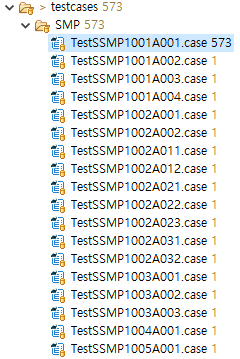
Figure 1. Appearance of test case creation
|
9. Module Test Cases
| Classification | Description |
|---|---|
Folder name - Composition |
testcases/moduleTest |
File name - Composition |
Test + Bean class name + 3-digit serial number |
File name - Example |
TestMSmpEmpInfMng001.mtest TestMSmpIntrLinkCall001.mtest |
File name - Basic principle |
It consists of the Test prefix, Bean class name, and a 3-digit serial number. They are created in the project’s testcases/moduleTest folder. The file extension is mtest. |
File name - Example |
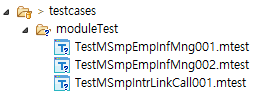
Figure 2. Appearance of test case creation
|
10. Local variables
No specific standard is provided for the names of local variables used inside methods. They can be declared and used freely, but names that make it easy to understand their meaning should be used as much as possible.
11. Naming Rules Example
If the naming rules guided in this chapter are followed, resources with the names shown in the following table should be generated.
| Classification | Description |
|---|---|
Project |
|
Service class name and Package |
|
Service IO name and Package |
|
Bean name and Package |
|
Bean IO name and Package |
|
DBIO name and Package |
|
DBIO IO name and Package |
|