Gradle Settings
The following tasks are required to configure the library dependencies needed for the generated project.
-
Modify the gradle.properties file to retrieve dependencies from repositories such as Maven and Artifactory
-
Modify the build.gradle file to register the required dependencies
1. Modifying the gradle.properties File
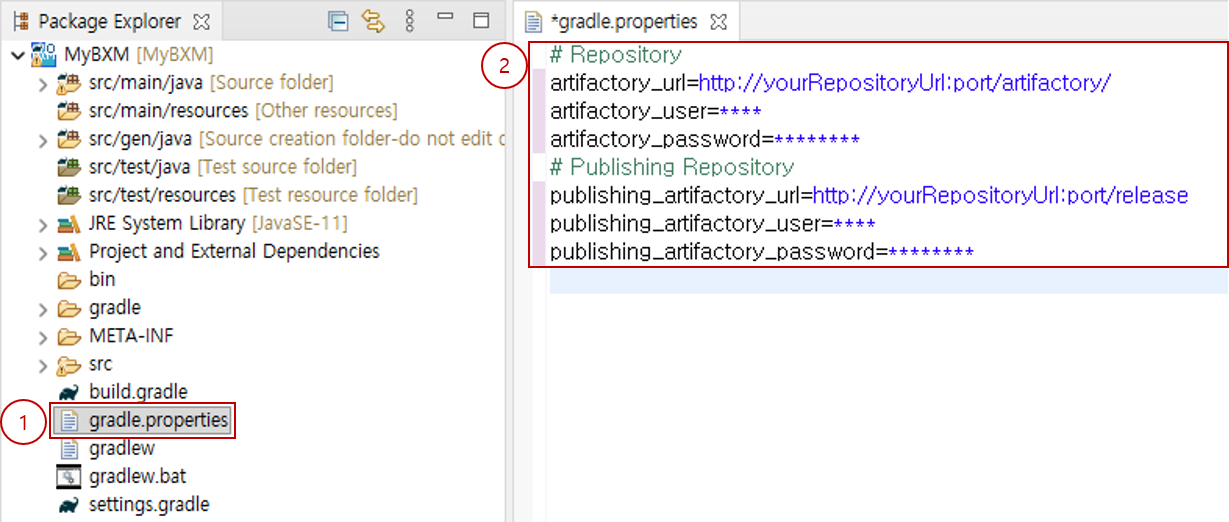
Modify the gradle.properties file to retrieve dependencies from repositories such as Maven and Artifactory.
-
Double-click gradle.properties to open the file in the editor.
-
Modify the repository information according to your runtime environment.
Contact your administrator for the repository information.
2. Modifying the build.gradle File
Modify the gradle.properties file to retrieve dependencies from repositories such as Maven and Artifactory.
-
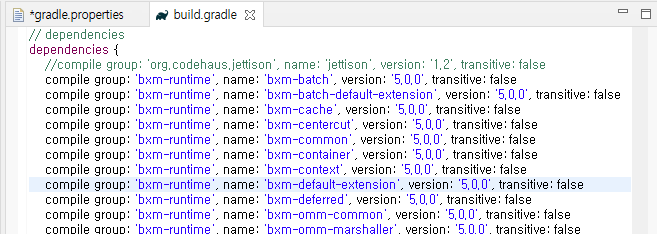
Enter the required dependency information in dependencies{..}.
The dependency information required by default is registered in the admin configuration.
3. Gradle Refresh
After completing the modifications of the repository information and the required dependency information, refresh Gradle to apply them to the project.
-
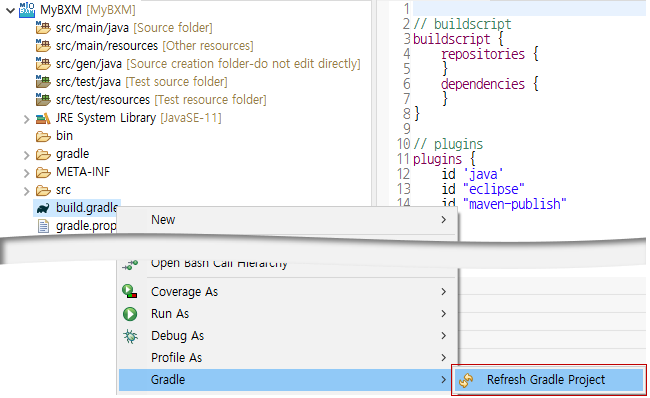
Select the project or the build.gradle file and right-click it.
-
Select Gradle / Refresh Gradle Project.
-
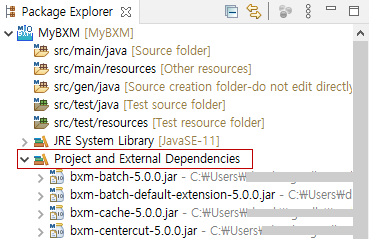
Check that the dependencies are added
If the refresh has completed successfully, the Project and External Dependencies classpath container will be added to the project.
You can verify that the libraries specified in dependencies{..} in the build.gradle file have been added under the added container.