Transaction Processing
The principle of the application development environment using the standard framework is that users do not intervene in detailed control related to transactions. For this purpose, users assign attributes at the method level (including operations) and use the Declarative Transaction Management model, in which the framework controls transactions in the runtime environment.
Depending on certain business characteristics, when a user needs to use transaction management code to separate transactions in detail or to perform transaction control according to exceptions, transactions can be controlled in the Programmatic Transaction Management method using the API provided by the framework.
1. Transactional Operation
A transaction is defined as a unit in which all data processing performed in the process of handling business logic must be retrieved and reflected as one bundle.
(1) As in the following example, the unit of a transaction can be the entire execution section of an operation or only a part of it depending on detailed requirements.
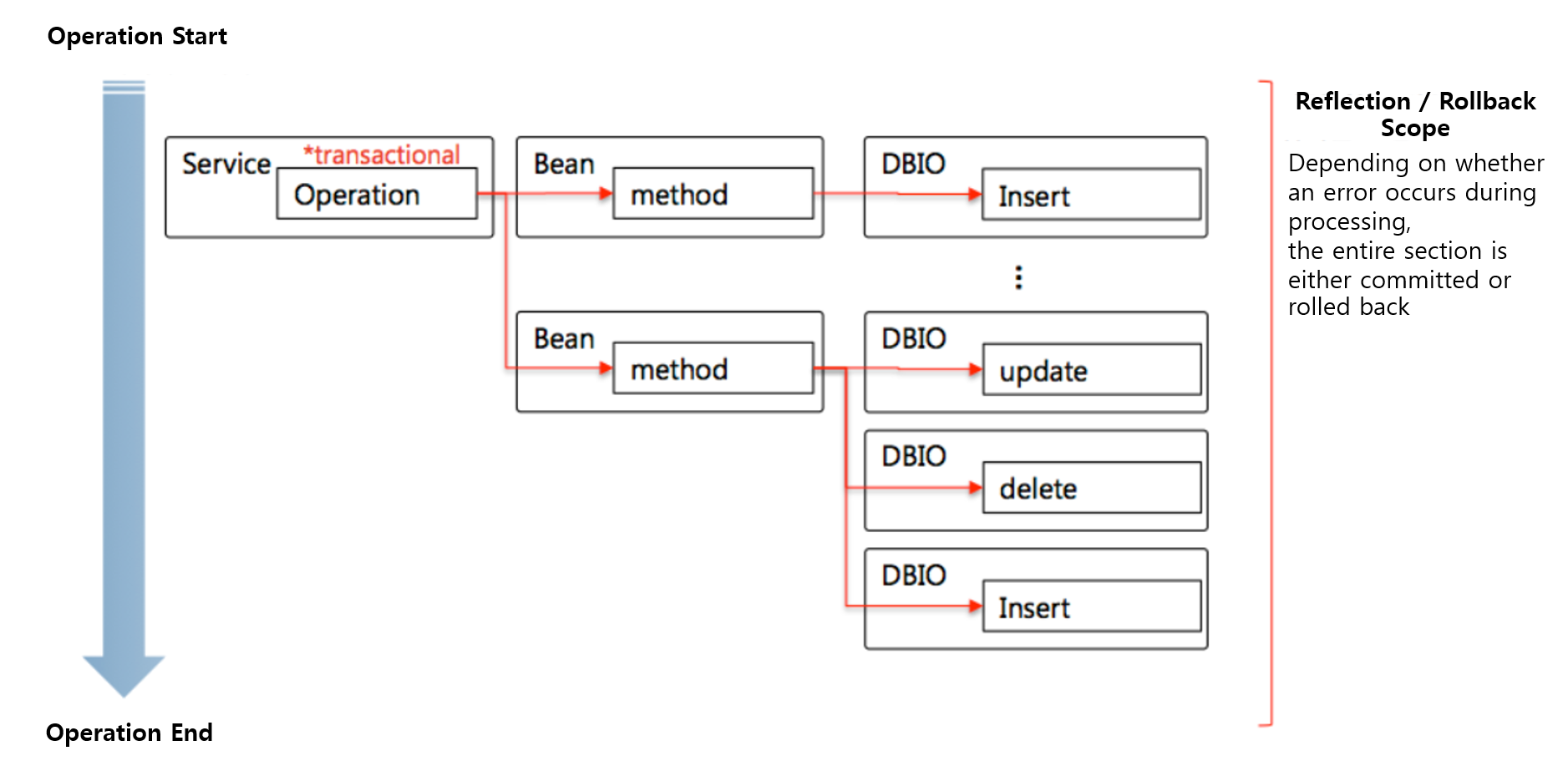
@BxmService("SSMP1001A")
@BxmCategory(logicalName = "Single Record Processing")
public class SSMP1001A {
    final Logger logger = LoggerFactory.getLogger(this.getClass());
    private MSmpEmpInfMng mSmpEmpInfMng;

    @BxmServiceOperation("ssmp1001a004")
    @BxmCategory(logicalName = "Single Record Delete")
    @TransactionalOperation
    public SSMP1001A004OutDto ssmp1001a004(SSMP1001A004InDto input) throws DefaultApplicationException {

        logger.debug("============== SERVICE START ==============");
        logger.debug("input = {}", input);

        mSmpEmpInfMng = DefaultApplicationContext.getBean(mSmpEmpInfMng, MSmpEmpInfMng.class);

        SSMP1001A004OutDto output = new SSMP1001A004OutDto();

        /**
         * Input value mapping
         */
        DSmpEmpTst000Dto beanInput = new DSmpEmpTst000Dto();
        beanInput.setFeduEmpNo(input.getFeduEmpNo());

        /**
         * Call sample employee information management bean retrieval
         */
        int removeCnt = mSmpEmpInfMng.removeEmpInf(beanInput);

        /**
         * Output value mapping
         */
        output.setSuccYn(removeCnt == 1 ? "Y" : "N");

        /**
         * Normal processing end
         */
        DefaultApplicationContext.addMessage("BXMI60000", null, new Object[] { });

        logger.debug("output = {}", output);
        logger.debug("============== SERVICE END ==============");

        return output;
    }
}
(2) Some bean methods called by a service operation can become a transaction section.
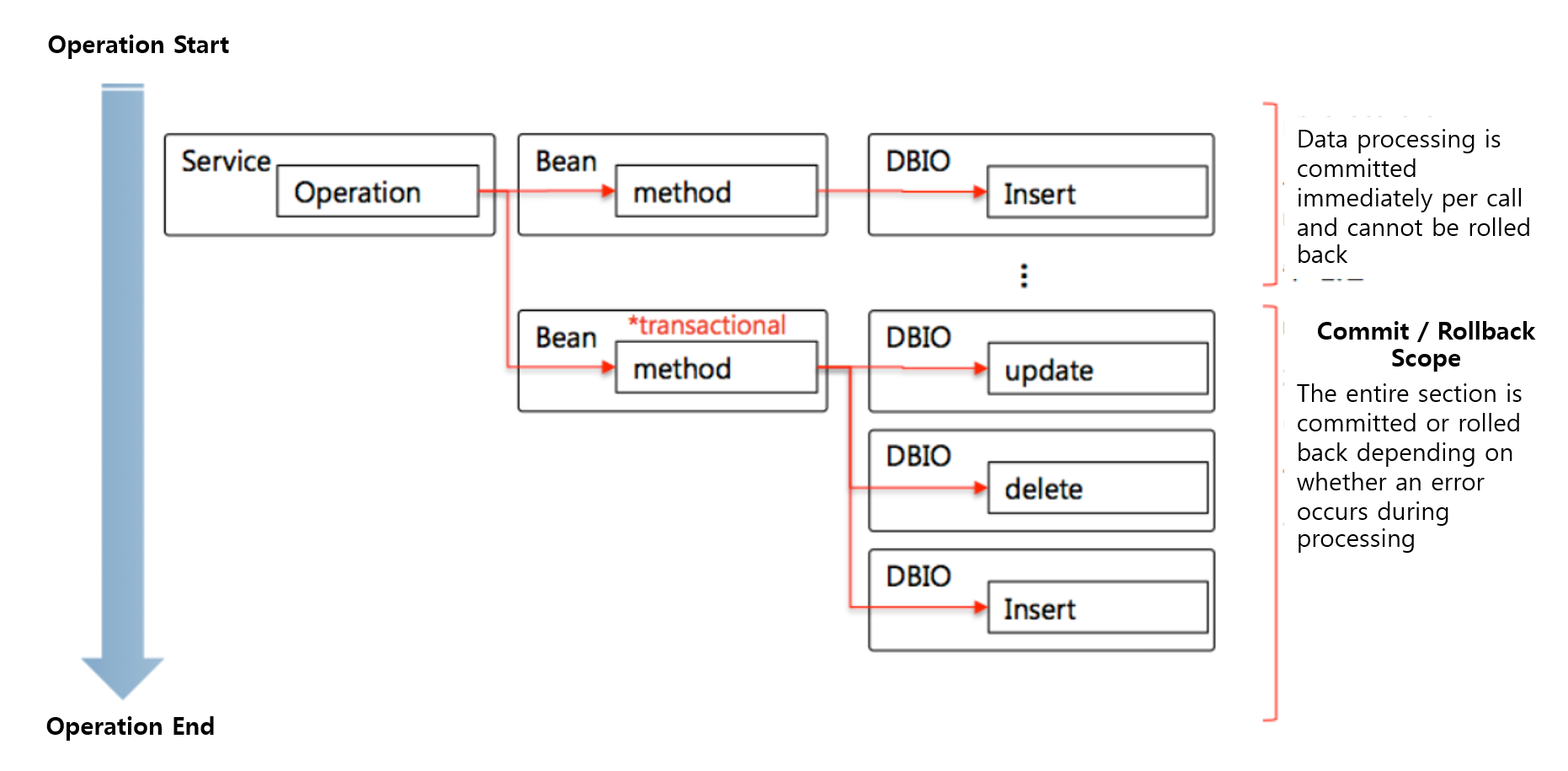
@BxmBean
@BxmCategory(logicalName = "Sample Employee Information Management")
public class MSmpEmpInfMng {
    final Logger logger = LoggerFactory.getLogger(this.getClass());

    private DSmpEmpTst000 dSmpEmpTst000; /* Sample Employee Information TST */

    /**
     * Retrieves employee information as a single record.
     *
     * @param    input    DSmpEmpTst000Dto
     * @return DSmpEmpTst000Dto
     * @throws DefaultApplicationException
     */
    @BxmCategory(logicalName = "Single Record Retrieve")
    @TransactionalOperation
    public DSmpEmpTst000Dto getEmpInf(DSmpEmpTst000Dto input) throws DefaultApplicationException {

        logger.debug("============== START ==============");
        logger.debug("input = {}", input);

        dSmpEmpTst000 = DefaultApplicationContext.getBean(dSmpEmpTst000, DSmpEmpTst000.class);


        DSmpEmpTst000Dto output = null;

        /**
         * Sample employee number selectOne
         */
        output = dSmpEmpTst000.selectOne00(input);

        logger.debug("output = {}", output);
        logger.debug("============== END ==============");

        return output;
    }
}
Business developers identify transaction sections according to business requirements and specify the "@TransactionalOperation" annotation on service-operation methods or bean methods.
2. Declarative Transaction Management
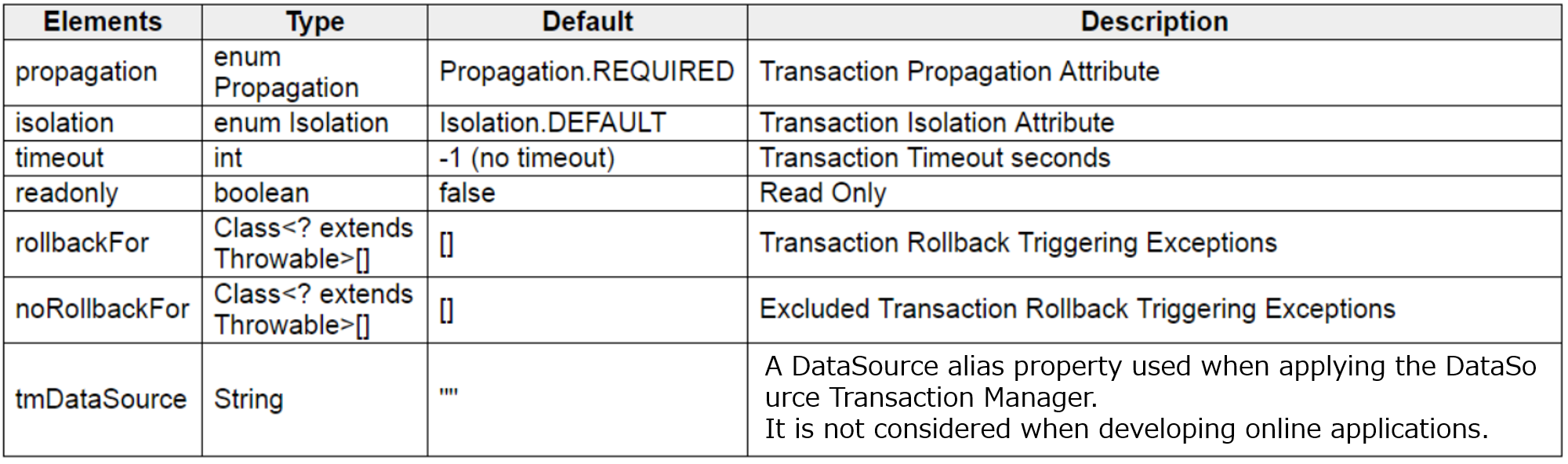
As in the code examples above, the method of explicitly declaring transaction units for processing is defined as a declarative definition model for transactions. According to this model, business developers assign transaction attributes using annotations at the method level, and the detailed attributes that can be assigned at this time are as follows.
-
propagation: Option related to transaction propagation to group transaction processing units
-
REQUIRED: If there is an existing started transaction, it participates in it; if not, a new transaction is started.
-
REQUIRES_NEW: Always starts a new transaction. If there is an ongoing transaction, the existing transaction is suspended. This option can be used to separate data processing from the ongoing transaction.
-
SUPPORTS: If there is an existing started transaction, it participates in it; if not, processing is performed regardless of any transaction (no transactional).
-
MANDATORY: If there is an existing started transaction, it participates in it; if not, an exception is thrown.
-
NOT_SUPPORTED: If there is an existing started transaction, it is suspended. Processing is always performed regardless of any transaction (no transactional).
-
NEVER: Processing is always performed regardless of any transaction (no transactional). If there is an existing started transaction, an exception is thrown.
-
NESTED: If there is an existing started transaction, it operates as a nested transaction of the existing transaction; if not, it operates the same as REQUIRED.
-
-
isolation: Option that defines the level at which a transaction is isolated from other transactions
-
DEFAULT: Uses the default isolation level provided by the platform. Generally, READ_COMMITTED from the list below is provided.
-
READ_COMMITTED: If the target data to be read has been modified by another transaction but not committed, it cannot be read.
-
READ_UNCOMMITTED: The target data to be read cannot be read even if it has been modified by another transaction and not committed.
-
REPEATABLE_READ: Data that has been read once in a transaction section is not modified by other transactions. That is, even if the same condition is used repeatedly to read data in the transaction section, it always retrieves the same data by blocking the possibility of external changes. However, other transactions can add data.
-
SERIALIZABLE: Data read in one transaction is exclusively occupied so that other transactions cannot make any changes or additions.
-
-
timeout: Transaction validity time; if the transaction is not completed within the specified time, an Exception occurs by the TransactionManager and then a rollback is performed.
-
readonly: Specifies handling for a read-only transaction.
-
rollbackFor: Defines the exception types that cause a transaction rollback as a list of exception classes.
-
noRollbackFor: Defines the exception types that do not cause a transaction rollback and are processed with a normal commit as a list of exception classes.
-
tmDataSource: When using the DataSource TransactionManager, specifies the DataSource Alias to be used by the TM. It is not used in online applications.
The following is an example code of an annotation specifying all configurable transaction options.
@TransactionalOperation(
        propagation= Propagation.REQUIRED,                                                              //  (1)
        isolation= Isolation.DEFAULT,                                                                   //  (2)
        timeout= 30,                                                                                    //  (3)
        readOnly= false,                                                                                //  (4)
        rollbackFor= { CustomerBizException.class, ProductBizException.class},                          //  (5)
        noRollbackFor= { DasDuplicateKeyException.class, NumberFormatException.class})                  //  (6)
public SSMP1001A001OutDto ssmp1001a001( SSMP1001A001InDto input) throws ApplicationException
{
    ... ...
}
(1) Specifies propagation. When the transaction needs to be separated, the value Propagation.REQUIRES_NEW is applied, and it is generally omitted.
(2) Usually omitted so that the default level is applied.
(3) Specifies the transaction timeout in seconds, and if there are no special requirements, it is omitted so that no timeout is applied.
(4) Assigns the read-only transaction attribute. It is usually omitted so that the false value is applied.
(5) When an exception of the registered type occurs, it is automatically rolled back. When a CheckedException[4] occurs, the default is that the user handles the exception, so it is not automatically rolled back. However, as in the example above, if the exception type is registered for rollback processing, the framework automatically performs a rollback when the corresponding exception occurs.
(6) For exceptions of the registered types, automatic rollback processing is not performed. When RuntimeException and Error occur, the default behavior is that they are automatically rolled back. However, as in the example above, if they are registered as exception types for which rollback processing is not performed, the framework does not automatically perform a rollback when the corresponding exception occurs.
3. Commit and Rollback of Transactions
A Transactional Operation specified by the user starts a transaction by the framework when a transaction start is required, and after processing is completed, the transaction is committed or rolled back depending on whether processing was normal and the type of exception that occurred.
3.1. Cases where the transaction of a Transactional Operation is committed
-
Processing in the transaction section was performed normally without exceptions.
-
An exception occurred, but the exception that occurred is a CheckedException.
-
An UncheckedException occurred, but the transaction noRollbackFor attribute includes the corresponding type.
3.2. Cases where the transaction of a Transactional Operation is rolled back
-
An UncheckedException occurred during processing in the transaction section.
-
A CheckedException occurred, but the transaction rollbackFor attribute includes the corresponding type.
-
DefaultApplicationException, which is defined as a CheckedException type, occurred. (Reflected depending on configuration)
4. Types of Transaction Separation
The following explains how to implement cases where only data processing in some areas of the entire transaction section that executes a service-operation of a processing type must be separated into transactions.
The following is an example of business requirements where transaction separation processing is required.
-
The customer management service provides an operation for new customer registration.
-
The new customer registration operation proceeds with the following steps.
-
Enter the information of the operator who registers the customer information.
-
Generate a customer number that can be managed uniquely in the customer management area.
-
Enter basic customer information using the generated customer number.
-
Enter the list of the customer’s address information.
-
Enter the list of the customer’s contact information.
-
The following are technical considerations according to the above business requirements.
-
Data entered during the customer registration process must be entirely reflected in or canceled from the DBMS depending on whether the task succeeds.
-
Input of operator information must be included in the data reflection unit.
-
For unique number generation in the system, a common bean for number generation is provided and used.
-
Data input and changes generated during the number generation process must be guaranteed to be individually reflected in the DBMS even if the entire operation fails.
The following is the processing flow to implement the above business requirements.
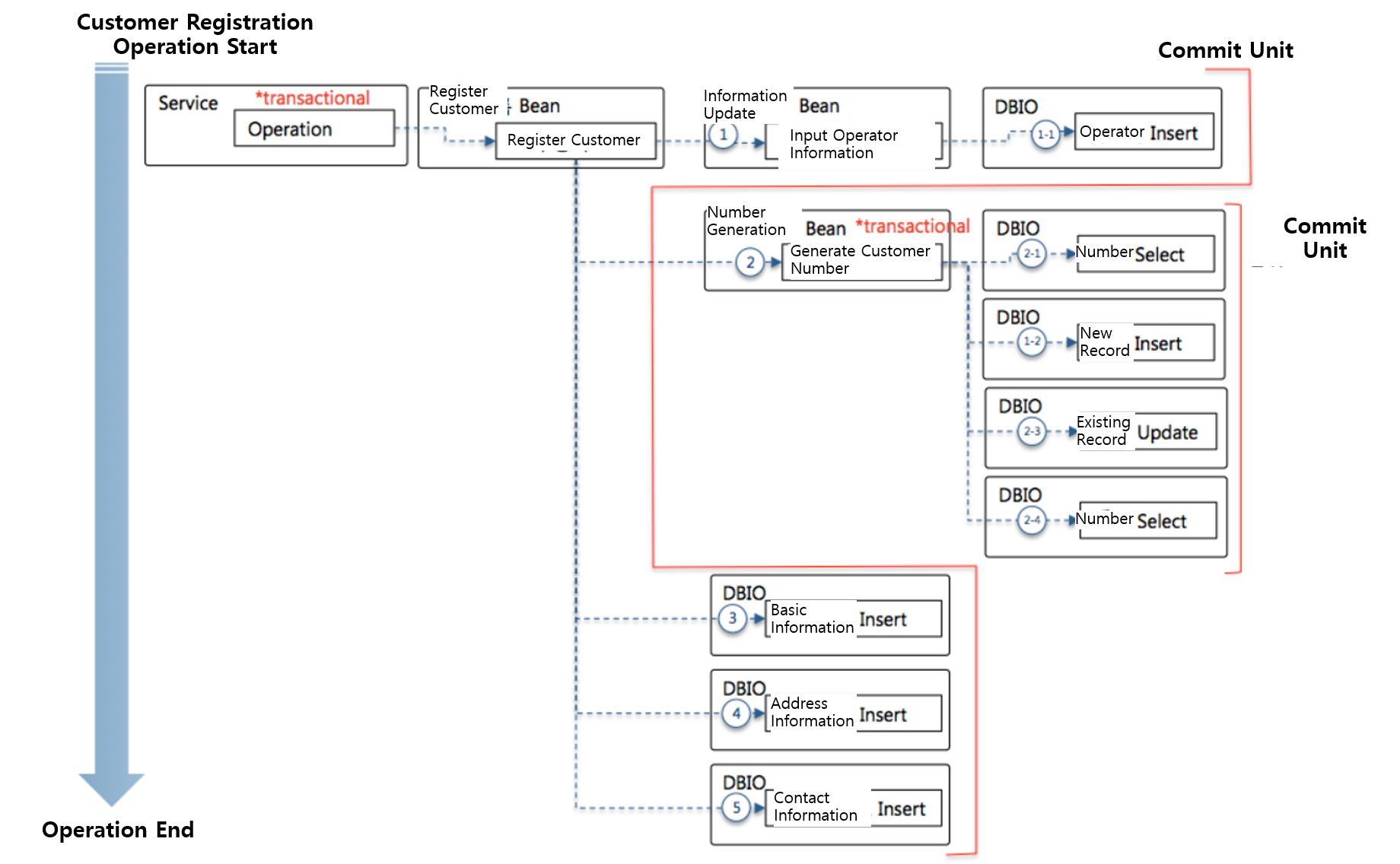
The following is an example of transaction attributes specified to implement the above technical considerations.
// Service-operation
@BxmfServiceOperation( "ssmp1034a021")
@TransactionalOperation                                                                                // (1)
public SSMP1034A021OutDto ssmp1034a021( SSMP1034A021InDto input) throws ApplicationException
{
    ... ...
}

// Common bean method for number generation
@TransactionalOperation( propagation= Propagation.REQUIRES_NEW)                                         // (2)
public synchronized BigDecimal makeBizNumber( String firstCategory, String secondCategory)
{
    ... ...
}
(1) To process the service-operation as a transaction unit, specify the @TransactionalOperation annotation at the operation declaration position.
(2) To process the transaction of the number generation method in the common bean for number generation individually, specify the @TransactionalOperation annotation and the attribute for an individual transaction (propagation= Propagation.REQUIRES_NEW) at the method declaration position.
5. Programmatic Transaction Management
The framework provides, along with the declarative definition model that delegates detailed processing related to transactions to the framework by specifying transaction attributes at the method level, a method that allows business developers to control detailed behavior using transaction APIs. In general, behavior related to transactions can be controlled using the declarative definition model. However, detailed control using the API may be required when exception handling depending on the result of data processing is needed.
The following explains detailed control of transactions according to business requirements through implementation examples using the transaction API. The examples below are written to explain detailed transaction control and are not suitable for application to actual business.
5.1. [Example] Transaction Exception Handling Type 1 - On exception, change processing to commit the transaction and return a normal response
In the following type, the following processing flow is implemented.
-
Enter history information.
-
Enter contact information.
-
If 1 and 2 are processed normally, the transaction is committed and the processing result is returned.
-
If an exception occurs during processing 1 or 2, the exception situation is handled in onException.
-
In onException, contact information is modified. Processing is changed by modifying contact information depending on the exception situation, and the transaction is not rolled back. That is, if the input of history information in transactionalProcess succeeds, the changes are reflected in the DBMS.
public TESTCONTACT createContactInfo( final TESTCONTACTIo contact)
{
    TransactionContext context= TransactionContextFactory.createJtaTransactionContext( Propagation.REQUIRED); // (1)
    TESTCONTACTIo result= context.execute( new TransactionalProcessor<TESTCONTACTIo>() {                   // (2)

        @Override
        public TESTCONTACTIo transactionalProcess() throws Exception                                          // (3)
        {
            contactExe.insertHistory( contact);
            contactExe.insertContact( contact);
            return contact;
        }

        @Override
        public TESTCONTACTIo onException( TransactionStatus status, Throwable th) throws Throwable            // (4)
        {
            contactExe.updateContact( contact);
            return contact;
        }
    });

    return result;
}
(1) Create a TransactionContext for transaction processing. The createTransactionContext for creation provides methods with the following parameters so that transaction attributes can be assigned.
-
public static TransactionContext createJtaTransactionContext( Propagation propagation)
-
public static TransactionContext createJtaTransactionContext( Propagation propagation, Isolation isolation)
-
public static TransactionContext createJtaTransactionContext( Propagation propagation, Isolation isolation, boolean readOnly)
-
public static TransactionContext createJtaTransactionContext( Propagation propagation, Isolation isolation, boolean readOnly, int timeout)
-
public static TransactionContext createJtaTransactionContext( Propagation propagation, int timeout)
-
public static TransactionContext createJtaTransactionContext( int timeout)
(2) Create a TransactionalProcessor innerClass that implements the business processing logic to be executed in the transaction context.
(3) Implement the business processing logic to be executed in the transaction context.
(4) Implement logic to handle exceptions when an exception occurs in the business processing logic (transactionalProcess method body) being executed in the transaction context.
5.2. [Example] Transaction Exception Handling Type 2 - On exception, roll back the transaction and propagate the exception
In the following type, the following processing flow is implemented.
-
Enter history information.
-
Enter contact information.
-
If 1 and 2 are processed normally, the transaction is committed and the processing result is returned.
-
If an exception occurs during processing 1 or 2, the exception situation is handled in onException.
-
In onException, the transaction is specified to be rolled back and the exception is delivered to the caller.
public TESTCONTACT createContactInfo( final TESTCONTACTIo contact)
{
    TransactionContext context= TransactionContextFactory.createJtaTransactionContext( Propagation.REQUIRED);
    TESTCONTACTIo result= context.execute( new TransactionalProcessor<TESTCONTACTIo>() {

        @Override
        public TESTCONTACTIo transactionalProcess() throws Exception
        {
            contactExe.insertHistory( contact);
            contactExe.insertContact( contact);
            return contact;
        }

        @Override
        public TESTCONTACTIo onException( TransactionStatus status, Throwable th) throws Throwable
        {
            status.setRollbackOnly();
            throw th;
        }
    });

    return result;
}
5.3. [Example] Transaction Exception Handling Type 3 - On exception, roll back the transaction and return a normal response
In the following type, the following processing flow is implemented.
-
Enter history information.
-
Enter contact information.
-
If 1 and 2 are processed normally, the transaction is committed and the processing result is returned.
-
If an exception occurs during processing 1 or 2, the exception situation is handled in onException.
-
In onException, the transaction is specified to be rolled back and a normal response is returned so that the normal flow continues.
public TESTCONTACT createContactInfo( final TESTCONTACTIo contact)
{
    TransactionContext context= TransactionContextFactory.createJtaTransactionContext( Propagation.REQUIRED);
    TESTCONTACTIo result= context.execute( new TransactionalProcessor<TESTCONTACTIo>() {

        @Override
        public TESTCONTACTIo transactionalProcess() throws Exception
        {
            contactExe.insertHistory( contact);
            contactExe.insertContact( contact);
            return contact;
        }

        @Override
        public TESTCONTACTIo onException( TransactionStatus status, Throwable th) throws Throwable
        {
            status.setRollbackOnly();
            return contact;
        }
    });

    return result;
}
When all DBIOs used in a single transaction section use the same DataSource, the DataSource TransactionManager can be used instead of the JTA transaction management API provided by the middleware.
The DataSource TransactionManager implements a method that guarantees a transaction by passing the same session to all DB Accesses used in the transaction section. This method guarantees better performance than using the JTA TransactionManager on the assumption that all DataSources used in data processing are the same. However, at the location where transaction attributes are assigned, it is not possible to clearly guarantee that all DBIOs called in the transaction section use the same DataSource, and it is not flexible to respond to changes in the application, so the development standard specifies using the JTA TransactionManager.
The author defines the exceptions that must be handled when calling the corresponding method and specifies them through the throws keyword of the method. FileNotFoundException is a well-known CheckedException, and if the caller of the method does not handle the exception, a compile error occurs, so exception handling using try and catch is enforced. Generally, user-defined exceptions defined by users are defined as CheckedExceptions that inherit from Exception.
These are exception and error types for which the compiler does not check whether the user has handled the exception using try and catch when calling and using the method. They include RuntimeException, Error, exceptions that inherit from RuntimeException, and errors that inherit from Error.