Design Environment Perspective
This section describes the design environment for designing BXM applications.
1. Workbench
The workbench of the design environment is composed as follows:
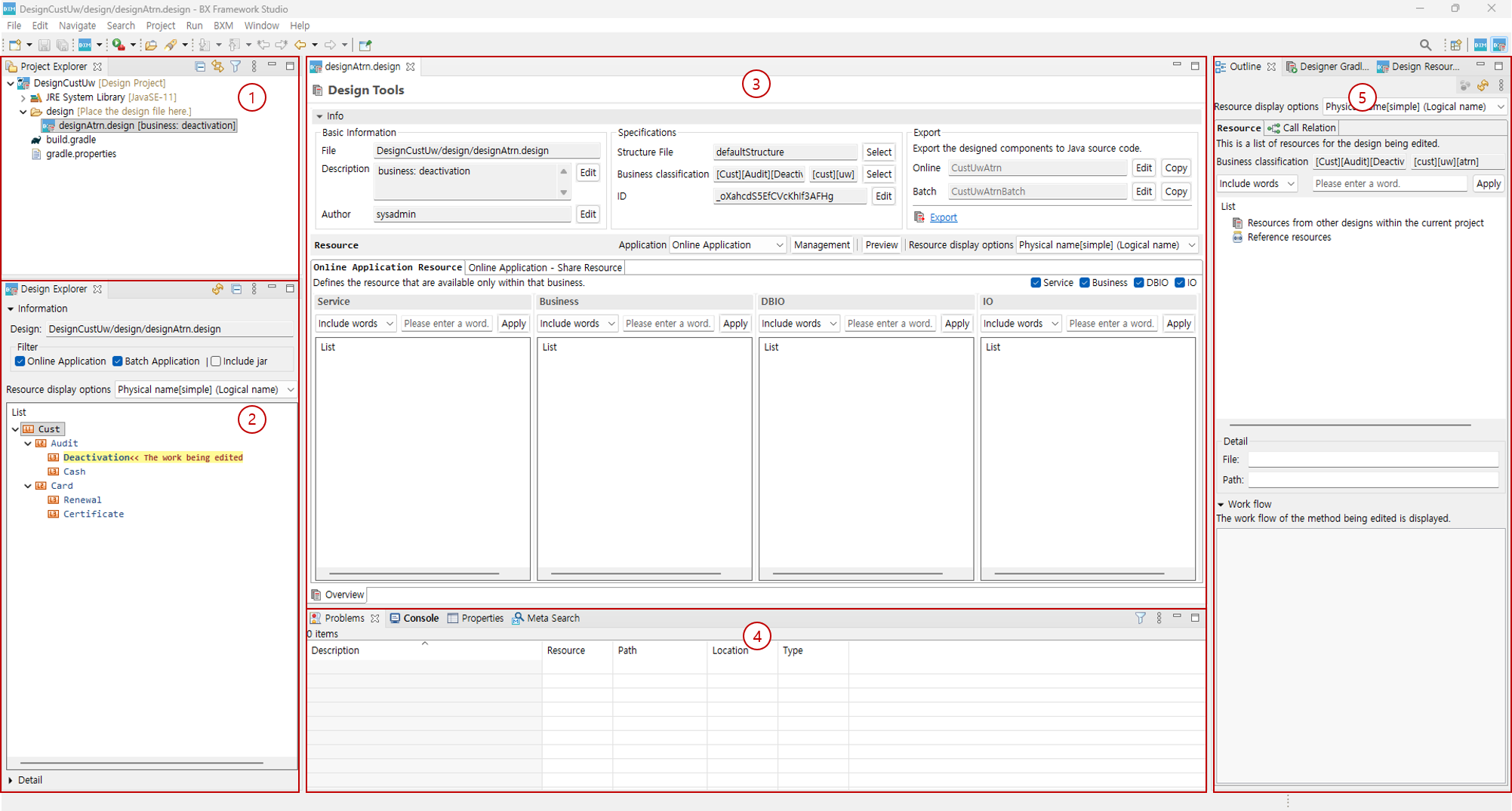
-
Project Explorer: Allows you to view a list of resources related to design projects and general projects.
-
Design Explorer: Allows you to view a list of resources described in design documents.
-
Editor: Allows you to use an editor to edit resources.
-
Viewer (Horizontal): Allows you to use viewers suitable for horizontal view.
-
Viewer (Vertical): Allows you to use viewers suitable for vertical view.
2. Wizard
BXM Studio provides various wizards to create resources required for BXM application design.
| Function name | Description |
|---|---|
New Design Project |
Creates a new design project. |
New Design |
Creates a new design. |
3. View
BXM Studio provides various viewers that can assist in BXM application design.
| Function name | Description |
|---|---|
Design Explorer |
Allows you to explore resources of design documents that exist in the workspace. |
Design Resource Search |
Allows you to search resources of design documents that exist in the workspace. |
Design Gradle Task |
Provides functions to build designed projects or update referenced design projects. |