Design Resource Search
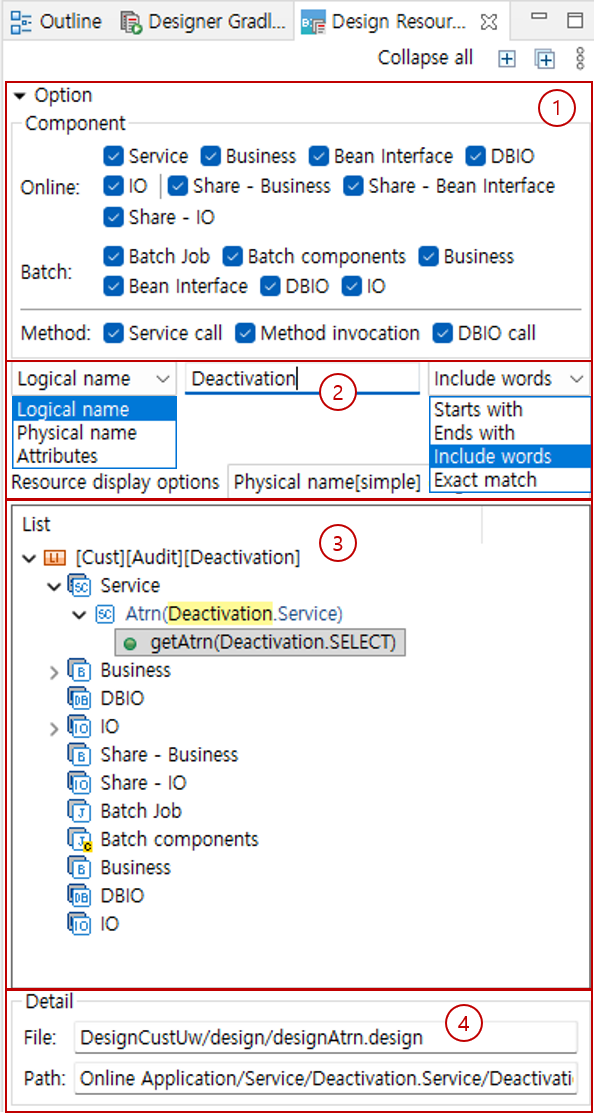
The Design Resource Search view is a view that supports searching all design files (including jars) contained in the Project Explorer. The composition of the Design Resource Search view is as follows.
-
Option 1
Specifies the component and method to search.
-
Option 2
Specifies the search scope. For logical names, you can specify the word matching scope when searching.
When searching by attribute, you can search by entering the key and value of the attribute, such as"name=Jone". -
List
This area displays the search results. It searches including jar files registered in the classpath, and parts that match the search term are highlighted in yellow.
You can double-click to open the corresponding component in the editor, and you can drag service methods, methods, and SQL IDs to the business area to add them to the flow. -
Detail
Displays the file path and the internal path in the file of the selected component.