Overview
This document describes the architecture and processing methods of BXM Center-Cut.
1. BXM Center-Cut Architecture
This section describes the architecture and components of BXM Center-Cut.
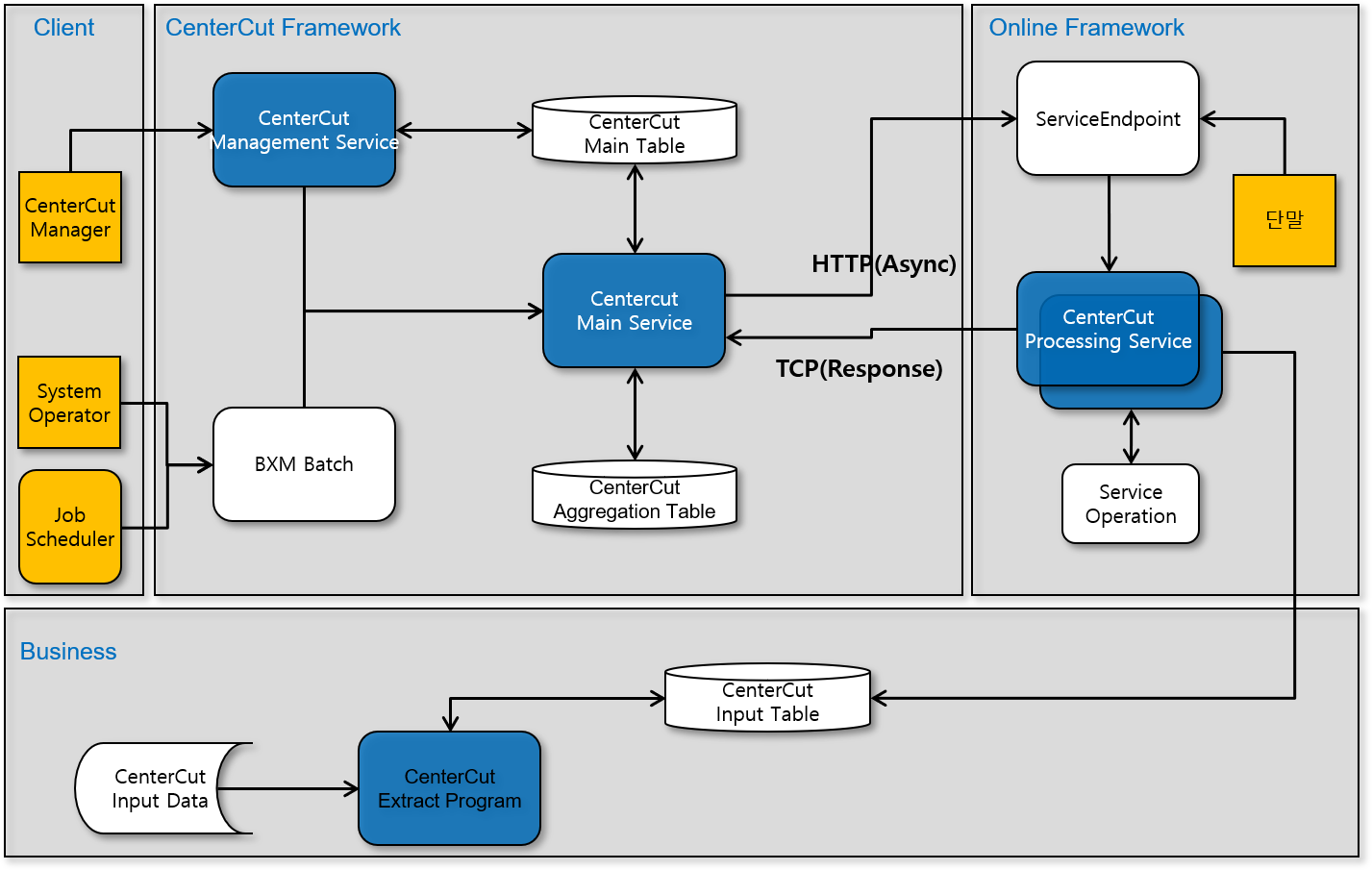
Center-cut is a Framework that aims to process large volumes of data in a short time by repeatedly calling online programs for terminal transaction processing to perform batch processing. Because it processes large volumes of data by using existing developed online programs, its processing speed is basically slower than batch. To compensate for this drawback, it is designed to process in parallel, which accordingly requires more resources (such as DB connection).
BXM Center-Cut Components
| Element | Description |
|---|---|
Job Management |
Manages center-cut jobs. |
Server Management |
Manages center-cut servers. |
Batch Registration |
Registers input data required for center-cut execution by using batch. |
Main Service |
Is called by Job Scheduler or BXM Web Admin and manages processing |
Processing Service |
Is called by the main service and reads data from the input table |
Aggregation |
Aggregates center-cut processing status and processing results. |
2. Center-Cut Processing Patterns
3. Center-Cut Data Partitioning Methods
There are the following two BXM Center-Cut data partitioning methods.
3.1. General Parallel Batch
A business batch job generates input data, and the order of the input data is not guaranteed.
Center-cut processing services are executed as many as the number of "Parallel Processing units" defined in the center-cut main table, and input data is allocated and processed as many as the "number of data items".
3.2. Sequential Parallel Batch
A business batch job generates input data, and the order of the input data is guaranteed.
The file or table data that is the target data for batch input data must be sorted in the key order that requires order guarantee.
The main service creates groups (execution numbers) as many as the number of "Parallel Processing units" defined in the center-cut basic information. A sequential processing key is assigned to each group, and each execution group calls one processing service and processes sequentially for the "number of data items", thereby guaranteeing priority while performing Parallel Processing.
4. Center-Cut Error Reprocessing
Input data for which an error occurs in the center-cut processing online service is automatically reprocessed according to the items registered in the center-cut basic information.
-
Jobs can be re-registered as many times as the "total number of execution rounds". In other words, if the "total number of execution rounds" is 3, the main transaction is executed (once), and error reprocessing can be executed 2 more times.
-
If the "error handling method" is "Do not reprocess errors", the administrator must manually re-register. In this case, for re-registered data, the Round Number is increased by 1 and a new job is registered.
-
If the "error handling method" is "Automatic re-registration", data for which errors have occurred is automatically re-registered. As above, for re-registered jobs, the Round Number is increased by 1.