Batch daemon monitoring
This menu is used to monitor batch daemons.
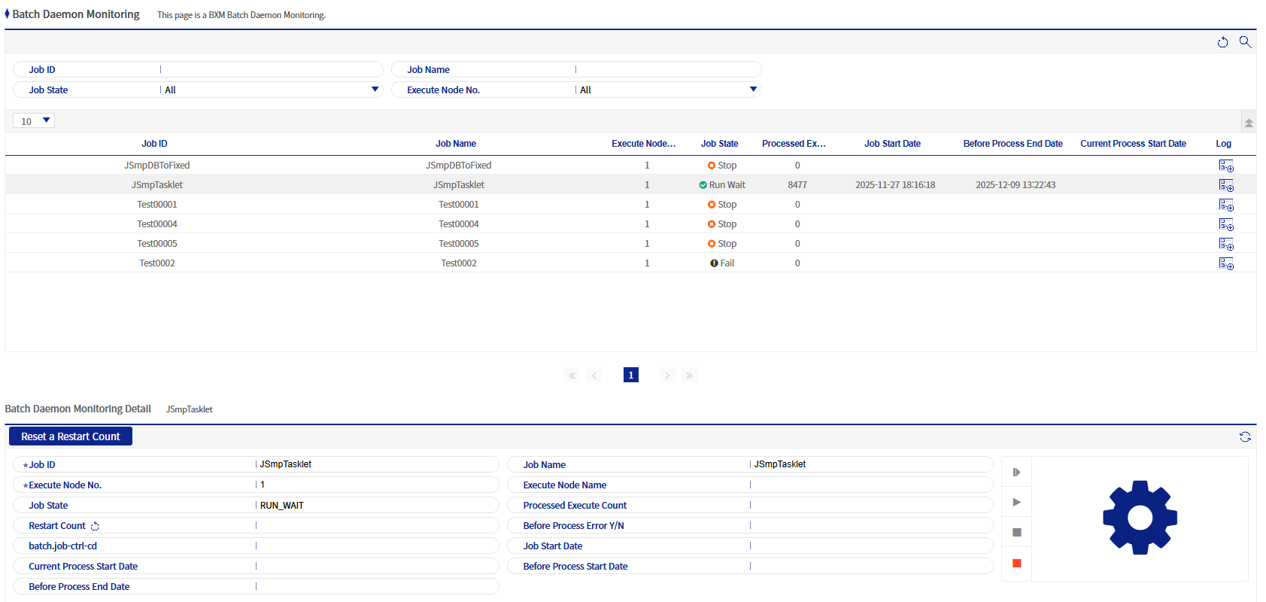
1. Monitoring details
You can check detailed information of each batch daemon and control operations such as start and stop.

|
"Number of restarts" indicates how many times the batch daemon has been restarted. However, once it reaches a certain number of times, further restarts are not possible, and in this case the count must be reset. The default value is set to "5". |
Refer to the following table for the functions of the control buttons on the right.
| Icon | Function name | Description |
|---|---|---|
|
Restart |
Restarts the batch daemon. |
|
Start |
Starts the batch daemon. |
|
Stop |
Stops the running batch daemon. |


|
Because batch daemon control is performed periodically, there may be cases where there is no immediate response after clicking a button. In such cases, check again after a few seconds by clicking Refresh at the top right of the details area. |