Deferred Process Job Status
This page is used to query the status of deferred process jobs. You can monitor deferred processes through this screen.
The search criteria use the deferred process ID and the operating date.
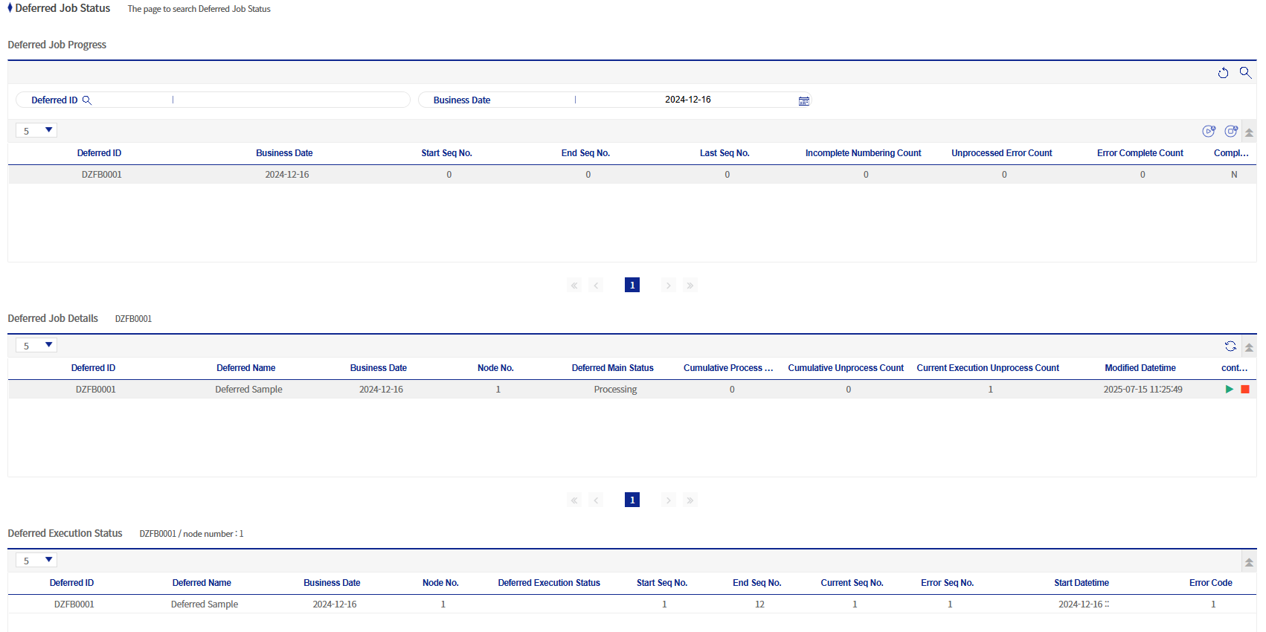
1. Deferred Process Job Progress Status
This screen displays the deferred process information corresponding to the operating date and the deferred process ID. There are Start All and Stop All buttons on the right.

The functions of the Start All and Stop All buttons are as follows.
| Icon | Function Name | Description |
|---|---|---|
|
Start All |
Executes all deferred process IDs displayed on the Deferred Process Job Status screen. |
|
Stop All |
Stops all deferred process IDs displayed on the Deferred Process Job Status screen. |


2. Deferred Process Job Details
This screen displays information for each node of the selected deferred process job. There are Start and Stop buttons on the right.

The functions of the Start and Stop buttons are as follows.
| Icon | Function Name | Description |
|---|---|---|
|
Start |
Executes the selected node. |
|
Stop |
Stops the selected node. |


